[OEM-style for Dodge Tundra] The KBSYNT dash cam is made in OEM style, which is perfect for car upholstery. The dash cam can only be used on Toyota Tundra 2022, 2023, 2024, 2025 and Sequoia 2023, 2024, 2025. The bracket should protrude from the cover. If the bracket is on the cover's left side, this car can't fit this dash cam, please check the second picture carefully before you order.
[Loop Recording & G-Sensor] When the TF card is full, continuous loop recording automatically overwrites the oldest footage with new recordings. Our dash cam supports a 64GB TF card (including a 128GB TF card) and can accommodate a maximum of a 256GB TF card. In a sudden collision, the G-sensor will detect the impact and lock the current video file to prevent it from being overwritten. Note: The 24H parking monitor needs an extra harness. Please contact us via Amazon if you need it
[4K Image and Ultra HD 2160P Video] Equipped with an f/1.6 aperture lens and a CMOS sensor, this 4K dash cam captures explicit videos at 2160P/30fps, ensuring you can see every detail. With HDR (High Dynamic Range) technology, the KBSYNT dash cam has good night vision and delivers sharp video and images even at night. In low-light conditions, the dash cam automatically adjusts the exposure for optimal visibility
[Easy operation & Free app] The KBSYNT 4K dash cam makes it easy to download videos using the free app and built-in 2.4GHz Wi-Fi. Exclusively designed for the KBSYNT dash cam, the app offers faster connection speeds and lower latency for living. Editing and sharing features make sharing beauty along the way easy. Tip: Turn off cellular data or Bluetooth if the preview is not working.Can't link carplay at the same time(WIFI's password:12345678)
[Connection tips] The dashcam's wifi has no network connection, it is used for transmitting videos. If the app can't show the live or preview, or fails to download the videos. Please try to shut off cellular data, If the app still doesn't work, please contact us, we will provide assistance


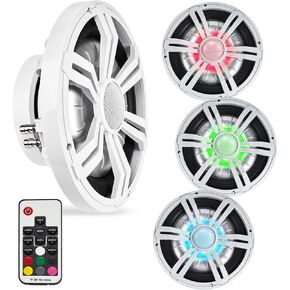 BELVA BMS12RW 1000W Peak (400W RMS) 12" Marine Subwoofer with Multi-Color LED Lighting for Boats/ATV/UTV/SxS/Powersport
KWD 29
BELVA BMS12RW 1000W Peak (400W RMS) 12" Marine Subwoofer with Multi-Color LED Lighting for Boats/ATV/UTV/SxS/Powersport
KWD 29
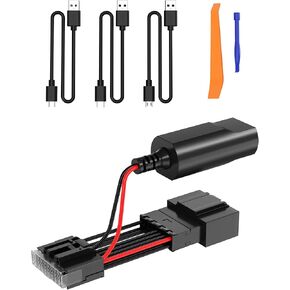 Dashcam Power Adapter (16-Pin Type A) for Ford Vehicles, Compatible with Bronco, Explorer, F150, F250, Mustang, Edge, Fiesta, Expedition, F350, and Flex. Dash Cam Power Adapter 16-Pin Type A
KWD 8.500
Dashcam Power Adapter (16-Pin Type A) for Ford Vehicles, Compatible with Bronco, Explorer, F150, F250, Mustang, Edge, Fiesta, Expedition, F350, and Flex. Dash Cam Power Adapter 16-Pin Type A
KWD 8.500
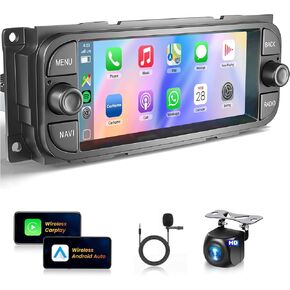 for Dodge Ram 1500/2500/3500 2002-2006, for Jeep Wrangler 2003-2006,Jeep Grand Cherokee 1999-2004-Android 13 Wireless CarPlay Android Auto 6.86" IPS Touch Screen Car Radio METEESER
KWD 53
for Dodge Ram 1500/2500/3500 2002-2006, for Jeep Wrangler 2003-2006,Jeep Grand Cherokee 1999-2004-Android 13 Wireless CarPlay Android Auto 6.86" IPS Touch Screen Car Radio METEESER
KWD 53
![[2G+64G] Car Radio for Mazda 3 2009-2013, Android Mazda 3 Stereo with 9 inch Touch Screen, Carplay/Android Auto/1080P/Bluetooth/WiFi +AHD Backup Camera in Kuwait](https://cdn1.tilga.com/md/prod/3/6035/3/155444454.50286.jpg) [2G+64G] Car Radio for Mazda 3 2009-2013, Android Mazda 3 Stereo with 9 inch Touch Screen, Carplay/Android Auto/1080P/Bluetooth/WiFi +AHD Backup Camera
KWD 41
[2G+64G] Car Radio for Mazda 3 2009-2013, Android Mazda 3 Stereo with 9 inch Touch Screen, Carplay/Android Auto/1080P/Bluetooth/WiFi +AHD Backup Camera
KWD 41




