- Shopping, made easy.
- /
- Get the app!

USB C to USB A 3.0 Adapter - Black
Convert Your USB-A peripherals
The adapter provides a hassle-free way of connecting USB-A devices to gadgets having USB-C ports. You can simply stick them onto the ends of flash drives, and not worry about losing your adapter.
You can also connect a c-adapter to USB cable to sync and charge your Mobile, Tablets and other devices.
High-quality Material
The USB C Adapter to USB 3.0 A is made of high-quality material which is heat-resistant, lightweight and compact, and you can take it with you anywhere and anytime.
Supports USB OTG
USB OTG: Plug in and you can use those computer peripherals like a flash drive, keyboard, hub, or mouse with your USB C equipped phone or tablet.
Easy to carry
Small size for easy carrying
Easy to Use: Minimalist design without any installation required, just simply plug and play.
Note
1. The USB 3.0 interface accords with the standard size. As a totally new product, it is normal that the USB A port is a little tight when you use it in the beginning. It will not damage the device or affect its using.
2. To avoid radio frequency interference between 2.4GHz wireless USB device and USB 3.1 Gen 1 device, you'd better connect the type c adapter and other devices with your laptop in the sockets on its two sides respectively.
 Ear Cushions Foam Replacement 60mm/2.4" Disposable Headphone Headset Earphones Sponge Covers, 5-Pairs
KWD 3
Ear Cushions Foam Replacement 60mm/2.4" Disposable Headphone Headset Earphones Sponge Covers, 5-Pairs
KWD 3
 Ear Hooks Earbuds Spare Fit Kit Replacement for Plantronics M70 Bluetooth Headset, 2 Hooks, Silicone Covers Ear-Gels S/M/L
KWD 3
Ear Hooks Earbuds Spare Fit Kit Replacement for Plantronics M70 Bluetooth Headset, 2 Hooks, Silicone Covers Ear-Gels S/M/L
KWD 3
 Ear Cushions Foam Replacement for Supra Plus Encore and Most Standard Size Office Telephone Headsets H251 H251N H261 H261N H351 H351N H361 H361N Headphones Disposable Covers, 5 Pairs
KWD 2
Ear Cushions Foam Replacement for Supra Plus Encore and Most Standard Size Office Telephone Headsets H251 H251N H261 H261N H351 H351N H361 H361N Headphones Disposable Covers, 5 Pairs
KWD 2
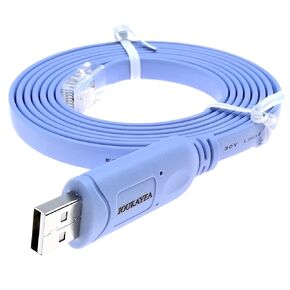 Micro USB Console Cable for Cisco Catalyst IR1800 Series Industrial Routers USB Type A to Micro-B CAB-USB-UB= Console Cable 2M
KWD 5
Micro USB Console Cable for Cisco Catalyst IR1800 Series Industrial Routers USB Type A to Micro-B CAB-USB-UB= Console Cable 2M
KWD 5

