- Shopping, made easy.
- /
- Get the app!
Our eplacement battery ffully replaces the NNTN6034 li-ion battery pack for the Motorola XTS 3000, XTS 3500, and XTS 5000 two way radios. The battery is 100% IMPRES compatible. Includes heavy-duty removable belt-clip. The 4500 mAh capacity rating is 8% higher than the OEM's 4150 capacity, translating to longer battery life per charge for FULL SHIFT CAPACITY, and more total charge cycles over the lifespan of the battery pack.
Please make sure to follow these instructions prior to using your battery for the first time:
In order for the features of IMPRES Smart Batteries and the Adaptive Charging System to be fully available, the data contained in the Batteries must be initialized by the charger the first time it is charged. Please make sure to follow these steps to ensure your IMPRES Battery performs properly.
1. Put the battery into the IMPRES charger. Make sure the charger indicator light shows a STEADY YELLOW. If the charger indicator shows differently, insert the battery again to get the STEADY YELLOW light. You may have to insert the battery a few times.
2. Leave the battery in the charger overnight. (12 Hours recommended for the first time.) If for some reason an interruption occurs, please repeat steps 1 and 2.
3. When the battery has finished calibration and initiation, you will be able to read capacity and other battery data from your device.
 Artisan Power Replacement Battery for Motorola CLS1100, CLS1410, CLS1450CB, CLS1450CH. 1200 mAh
KWD 18
Artisan Power Replacement Battery for Motorola CLS1100, CLS1410, CLS1450CB, CLS1450CH. 1200 mAh
KWD 18
 Artisan Power Replacement Battery for Motorola DTR410, DTR510, DTR550, DTR610, DTR650, MTH650, MTH800, i365, i355. 2000 mAh
KWD 23
Artisan Power Replacement Battery for Motorola DTR410, DTR510, DTR550, DTR610, DTR650, MTH650, MTH800, i365, i355. 2000 mAh
KWD 23
 Artisan Power P-6423: C-Shape Single Wire Headset for Motorola CLS1410 and CLS1100 Radios: RLN6423, HKLN6423, HKLN4604
KWD 10
Artisan Power P-6423: C-Shape Single Wire Headset for Motorola CLS1410 and CLS1100 Radios: RLN6423, HKLN6423, HKLN4604
KWD 10
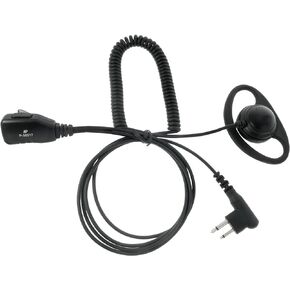 Artisan Power P-56517: D-Shape 2-Wire Headset for Motorola CLS1410 and CLS1100 2-Way Radios: PMLN5001, HKLN4599, 56517
KWD 10
Artisan Power P-56517: D-Shape 2-Wire Headset for Motorola CLS1410 and CLS1100 2-Way Radios: PMLN5001, HKLN4599, 56517
KWD 10




