Microsoft Surface Stylus for Surface Pro 12/11/9/X/8/7/6/5/4/3, Surface Go 4/3/2/Surface Laptop 6/5/4/3/Studio/Book, Surface Pro 11 Copilot Pen for Surface Fast Charge, Gray
【Surface Stylus Pen Gray】 No drivers or Bluetooth setup are required for the Microsoft Surface Pen. Simply press any button to start writing. With original pen tip, long life and screen protection. In addition, it supports erasing and right-click function ; The pen body is equipped with LED charging indicator to let you know the battery status. Equipped with 3 interchangeable refills and charging cable.
【Magnetic Adsorption】The Microsoft Surface Pro pen has a magnetic design and can be firmly attached to the Microsoft Surface Pro/Go/Book/Laptop/Studio at any time. You can take it off at any time to record when inspiration strikes. Perfect for students, business professionals and creatives who frequently take notes and draw. The microsoft surface pen design with eraser and right-click functions, As shown in the picture, long press to perform the desired function
【4096 Pressure Sensitivity and Palm Rejection】 The Surface Pen has 4,096 levels of pressure sensitivity, allowing for precise sketching and coloring without writing delays; palm rejection technology allows you to place your hand naturally when writing without worrying about friction.The Surfac stylus does it all with pixel-perfect precision, tilt and pressure sensitivity, and imperceptible lag.
【Type C Fast Charging and Long Standby Time】 The stylus for Microsoft Surface only charges for about 5-10 minutes and allows 10 hours of continuous use (no fast charging adapter required). The stylus automatically turns off when inactive for 10 minutes Save battery power and extend usage time. If the indicator light is red, it means that the battery is low or charging. If the indicator light is blue, this means that the battery is fully charged and being used.


 USB C USB 3.0 Multi Card Reader, 7 in 2 Memory Card Reader for SD SDXC SDHC/TF/CF CFI/XD/MS MMC with USB C/USB3.0 Adapter, 5Gbps Dual Ports Card Reader Compatible with Windows/Mac/Linux/Android
KWD 8.500
USB C USB 3.0 Multi Card Reader, 7 in 2 Memory Card Reader for SD SDXC SDHC/TF/CF CFI/XD/MS MMC with USB C/USB3.0 Adapter, 5Gbps Dual Ports Card Reader Compatible with Windows/Mac/Linux/Android
KWD 8.500
 USB C Multi Card Reader 7-in-1 Aluminum SD/Micro SD/CF/MS/XD Card Reader, 5Gbps High Speed Camera Card Reader for SDXC SDHC TF CF MS MMC, Sony Memory Stick Pro Duo Adapter Read 5 Cards Simultaneously
KWD 8
USB C Multi Card Reader 7-in-1 Aluminum SD/Micro SD/CF/MS/XD Card Reader, 5Gbps High Speed Camera Card Reader for SDXC SDHC TF CF MS MMC, Sony Memory Stick Pro Duo Adapter Read 5 Cards Simultaneously
KWD 8
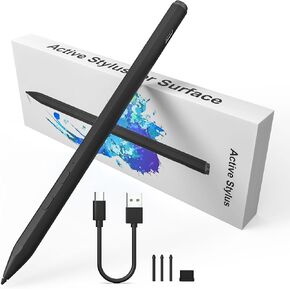 Microsoft Surface Pen for Surface Pro 9/8/11/10/7/6/5/4/3/, Fast Charging Stylus for Surface Go 2/3/Book/Laptop, Palm Rejection 4096 Pressure Sensitivity, Magnetic Adsorption
KWD 12
Microsoft Surface Pen for Surface Pro 9/8/11/10/7/6/5/4/3/, Fast Charging Stylus for Surface Go 2/3/Book/Laptop, Palm Rejection 4096 Pressure Sensitivity, Magnetic Adsorption
KWD 12
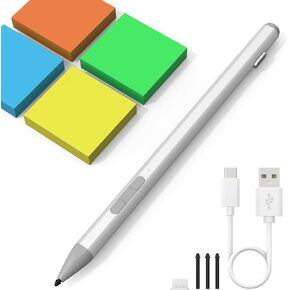 Surface Pen Stylus for Microsoft Surface Pro 11/10/X/9/8/7/7+/6/5/4/3, Surface Go 4/3/2/1, Surface Laptop/Studio/Book 4/3/2/1 Stylus Pen with Palm Rejection, 4096 Pressure, Magnetic, 4Nibs,Rehargeable
KWD 12
Surface Pen Stylus for Microsoft Surface Pro 11/10/X/9/8/7/7+/6/5/4/3, Surface Go 4/3/2/1, Surface Laptop/Studio/Book 4/3/2/1 Stylus Pen with Palm Rejection, 4096 Pressure, Magnetic, 4Nibs,Rehargeable
KWD 12




