- Shopping, made easy.
- /
- Get the app!
Mouse Anti Hibernator - Keep your computer active and enjoy your free time!
Packing list:
a mouse mover
a USB-C power cord
a quick start guide User Manual
Usage
1.Connect the product to the computer or 5V charging head USB port power supply;
2.Place the optical sensor of the mouse on the turntable area:
3.Make sure the interface connection is stable, press the power switch of the product, turn on the indicator light, the mouse pointer will move automatically, press the power switch again, turn off the indicator light,
4. Lighting key: control the product aperture effect, long press to turn on and off, light press to switch the light colour, to meet different people's preferences:
5. Timing key: 4 gears can be selected: 0.5H/1H/2h/4h (see front view) press the timing key to select press the timing key to select the timing time, the timing indicator lights sequentially, can be switched cyclically.
 -18%
FC112 USB Optical Wired Computer Mouse with Easy Click for Office and Home, 1000DPI, Premium and Portable,Compatible with Windows PC, Laptop, Desktop, Notebook (Black)
KWD 7
-18%
FC112 USB Optical Wired Computer Mouse with Easy Click for Office and Home, 1000DPI, Premium and Portable,Compatible with Windows PC, Laptop, Desktop, Notebook (Black)
KWD 7
 -6%
Wireless Keyboard and Mouse Combo-Full Size QWERTY Layout 2.4G Stereo Keycap Ergonomically Designed Mechanical Keyboard Set for Windows, PC,Laptop, Notebook,Computer with USB-A&USB-C 2-in-1 Receiver
KWD 8
-6%
Wireless Keyboard and Mouse Combo-Full Size QWERTY Layout 2.4G Stereo Keycap Ergonomically Designed Mechanical Keyboard Set for Windows, PC,Laptop, Notebook,Computer with USB-A&USB-C 2-in-1 Receiver
KWD 8
 Wireless Keyboard and Mouse Combo-Full Size QWERTY Layout 2.4G Stereo Keycap Ergonomically Designed for Laptop,PC,Notebook,Windows,Computer Wired Numeric keypad,with USB-A&USB-C 2-in-1 Receiver
KWD 8.500
Wireless Keyboard and Mouse Combo-Full Size QWERTY Layout 2.4G Stereo Keycap Ergonomically Designed for Laptop,PC,Notebook,Windows,Computer Wired Numeric keypad,with USB-A&USB-C 2-in-1 Receiver
KWD 8.500
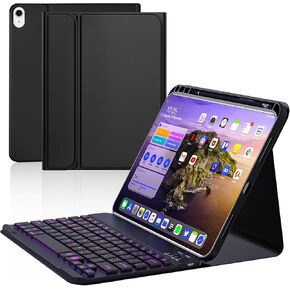 10th Case with Bluetooth Keyboard Compatible with iPad 10th Generation 10.9-inch 2022, Protective Cover with Pencil Holder,Detachable Wireless Rechargeable Keyboard with Adjustable Backlit
KWD 8.500
10th Case with Bluetooth Keyboard Compatible with iPad 10th Generation 10.9-inch 2022, Protective Cover with Pencil Holder,Detachable Wireless Rechargeable Keyboard with Adjustable Backlit
KWD 8.500




