【Transmission & Charging 2 in 1】AGFINEST 2-in-1 charging converter, designed for connecting AR glasses or wearable devices, allows you to enjoy a new viewing experience and immerse yourself in the fun of AR videos. Specially equipped AR charging module to solve the charging problem after connecting AR glasses. Equipped with high-quality transmission signals and protocols to ensure stable data transmission, strong image detail recovery and no loss of sound quality.
【4K@60Hz Ultra HD + Power Supply 100W】: USB C Adapter supports 4K@60Hz. At the same time, the adapter carries a power supply port: when using smart glasses, you never have to worry about power problems; When using the display/projector, one USB-C port can transmit audio and video and power supply at the same time.Please use a charger that supports the PD protocol (usually marked with the letters “PD”).Note: The adapter is primarily used to power input devices and can only provide approximately 5W of power to AR glasses.
【Portable and Lightweight】Smart AR Glasses Adapter is no need for tedious setup or any programme just plug and play. Compact size, easy to carry, suitable for traveling use.Thanks to the tin-plated interface and triple shielding technology, signal transmission is stable, keep audio/video synchronization. The aluminium alloy shell is durable and provides excellent heat dissipation.
【High compatibility】 Compatible with a wide range of smart glasses: Xreal/Nreal, Rokid Air/Max, RayNeo XR, Viture One, Thunderbird AR and more. Compatible with Switch, Steam Deck, ROG Ally and more. Compatible with various USB-C portable displays, USB-C projectors, Google TV, Fire TV Stick and more. Compatible with laptop, mobile phone, camera, monitor, MacBook, iMac, iPad, IOS, Android, Windows, Dell, Asus, Huawei, HP, Lenovo and more. Note: Not compatible with Switch 2!
【Notice】1. Please update the firmware version of the AR glasses to the latest version; 2. If the adapter does not work properly, please reconnect the (USB-C OUT) port of the adapter; 3. Please make sure that the connected device supports audio and video transmission.4.If there is no image transmission when using the adapter, try changing the connection sequence: first power the adapter, then connect the glasses, and finally connect the mobile phone or other signal source; or first power the adapter, connect the signal source, and finally connect the glasses.


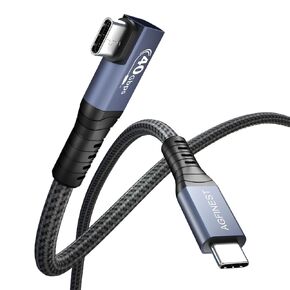 Certified USB4 Cable Right Angle (240W 40Gbps 8K@60Hz), Compatible with Thunderbolt 3 USB C Cord for MacBook, iPad Pro, iPhone 15, Monitor, Docking Station (3ft)
KWD 6
Certified USB4 Cable Right Angle (240W 40Gbps 8K@60Hz), Compatible with Thunderbolt 3 USB C Cord for MacBook, iPad Pro, iPhone 15, Monitor, Docking Station (3ft)
KWD 6
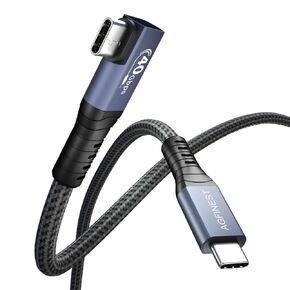 USB4 Cable 6ft Dual Right Angle (40Gbps, 100W Fast Charging, 8K@60Hz Video), USB C to USB C Cord Compatible with Thunderbolt 3 for MacBook, Mac Mini, iPad Pro, iPhone 15, XPS
KWD 4.500
USB4 Cable 6ft Dual Right Angle (40Gbps, 100W Fast Charging, 8K@60Hz Video), USB C to USB C Cord Compatible with Thunderbolt 3 for MacBook, Mac Mini, iPad Pro, iPhone 15, XPS
KWD 4.500
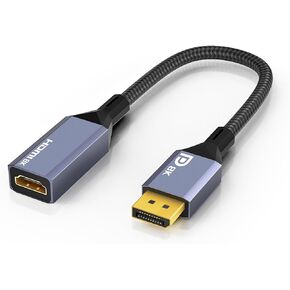 8K DisplayPort to HDMI Adapter (DP 1.4 to HDMI 2.1 Female), Uni-Directional Converter 4K 120Hz, 8K 60Hz, 2K 240Hz for PC Laptop Monitor TV
KWD 9
8K DisplayPort to HDMI Adapter (DP 1.4 to HDMI 2.1 Female), Uni-Directional Converter 4K 120Hz, 8K 60Hz, 2K 240Hz for PC Laptop Monitor TV
KWD 9
 USB C to DisplayPort 1.4 Cable 3.3ft (Support 8K@60Hz, 4K@144Hz, 2K@240Hz) Thunderbolt 3/4 to DP Cord Compatible with MacBook Pro, Mac Mini, XPS, iPad, iPhone 15
KWD 6
USB C to DisplayPort 1.4 Cable 3.3ft (Support 8K@60Hz, 4K@144Hz, 2K@240Hz) Thunderbolt 3/4 to DP Cord Compatible with MacBook Pro, Mac Mini, XPS, iPad, iPhone 15
KWD 6




