Firmware v1.0.2.1 have been released. Fix the issue where the handbrake cannot be used and cannot connect to HCXLELD Hub on Windows 10/11. Please refer to the video tutorial on the listing to set the handbrake to bootloader mode to upgrade the handbrake firmware. Since the handbrake app and firmware in current inventory is not the latest version, players are advised to update upon receiving the product by HCXLELD Hub App.
Please make sure that your steering wheel firmware is up to date by Thrustmaster control panel. The handbrake is not compatible with the old firmware version of the Thrustmaster steering wheel. Please watch the product video for troubleshooting.
Multi platform compatibility: the handbrake supports Thrustmaster T150(Including: T150 PRO) T128P T248P T300 steering wheel(Including: T300rs, T300 Ferrari) for PS4/PS5, it also supports TMX(Including: TMX PRO) T128X T248X TX racing steering wheel for Xbox One/ Xbox Series X|S. In addition, the handbrake does not support other steering wheels on PS/Xbox.
TMX cannot use axis function on Xbox platforms, we offer a solution to map the clutch axis to the handbrake axis, which can be adapted to most games.
HCXLELD Hub application for the Windows system, which can calibrate the handbrake stroke, set the dead zone, set the curvature, and update the firmware. Please run the HCXLELD Hub as administrator on Windows, otherwise you do not have sufficient permissions to use the firmware's automatic update.
Metal material: the handbrake is made of aluminum alloy material, which is lightweight, sturdy and strong. In addition, the handbrake is equipped with a stainless steel clamp, which can be adapted to different sim racing cockpit for more convenience
Note that after calibrating the travel with HCXLELD Hub, ensure that the travel value is 0% when the handbrake is not pulled, otherwise the handbrake cannot be connected to Xbox.
 Suncala (NOT HDMI) 6FT AV TV RCA Audio Video Cord Cable for Playstation PS2 PS3 Cable (1Pack)
KWD 2
Suncala (NOT HDMI) 6FT AV TV RCA Audio Video Cord Cable for Playstation PS2 PS3 Cable (1Pack)
KWD 2
 (5 Pack) XSP Battery for Sony Lite PSP 2th PSP-2000 PSP-3000 PSP-3004 Silm PN Sony PSP-S110
KWD 25.500
(5 Pack) XSP Battery for Sony Lite PSP 2th PSP-2000 PSP-3000 PSP-3004 Silm PN Sony PSP-S110
KWD 25.500
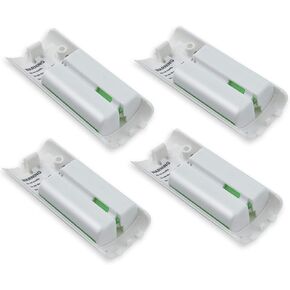 4-Pack Rechargeable Battery Packs for Wii and Wii U Remote Controller,High-Capacity Ni-MH Battery(2800mAh) Replacement for Nintendo Wii Remote Charging Station(Charger not Included)
KWD 7
4-Pack Rechargeable Battery Packs for Wii and Wii U Remote Controller,High-Capacity Ni-MH Battery(2800mAh) Replacement for Nintendo Wii Remote Charging Station(Charger not Included)
KWD 7
 weishan HD60 S+ Chat Link Pro Cable Replacement for Elgato HD60 X, HD60PRO Capture Card, Chat Adapter Replacement for Nintendo Switch, Xbox One and PS5, with in-line Isolator
KWD 6
weishan HD60 S+ Chat Link Pro Cable Replacement for Elgato HD60 X, HD60PRO Capture Card, Chat Adapter Replacement for Nintendo Switch, Xbox One and PS5, with in-line Isolator
KWD 6




