TikTok Scrolling Remote: You can use the Scrolling remote to swipe to the next or previous video, give a like, adjust the volume, and swipe left or right. Free your hands with this Bluetooth remote. iOS devices: Settings: Open Settings > Accessibility > Zoom > Turn on Zoom > Use three fingers to double-tap the screen to restore. Compatible with Tiktok/YouTube/Instagram/Snapchat/Facebook etc
ALL IN ONE: The package includes a tripod mount, holder, and a neck strap – everything you need to use the product comfortably in different situations. Get it all with one simple payment.
One-click photo taking: when you need to take a selfie or a family photo, just open your phone's camera and press the remote's camera icon button. No need to ask a stranger for help! The maximum operation distance is 33 feet.
Zoom in and out: This iphone camera remote has a zoom-in and zoom-out function. With the plus or minus keys, you can adjust the focal length of your cellphone camera. Long press the zoom +/- keys to steplessly zoom, ensuring a smooth zooming experience. Note: The front camera does not have a zoom function, and this function does not work with iPads or any other types of pads.
Compatibility note: iPhone (system version above V14.8 required). Before use, open the Settings menu on your iOS device. Open Settings > Accessibility > Zoom > Turn on Zoom > Using three fingers, double-tap the screen to restore. For Android phones, only connect via Bluetooth and then use.


 Universal Phone Tripod Mount Adapter with Wireless Camera Remote, Cell Phone Holder with Adjustable Clamp for Selfie Stick Monopod Compatible with iPhone, Samsung and so on, Wrist Strap Included
KWD 4.500
Universal Phone Tripod Mount Adapter with Wireless Camera Remote, Cell Phone Holder with Adjustable Clamp for Selfie Stick Monopod Compatible with iPhone, Samsung and so on, Wrist Strap Included
KWD 4.500
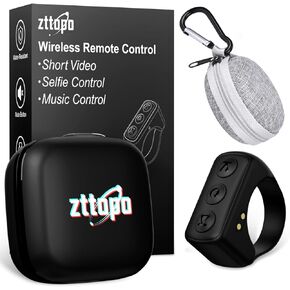 TikTok Scrolling Ring, TIK Tok Bluetooth Remote Control, Kindle APP Page Turner with Carrying Case, Camera Photo Clicker for iPhone, iPad, iOS, Android-White
KWD 6.500
TikTok Scrolling Ring, TIK Tok Bluetooth Remote Control, Kindle APP Page Turner with Carrying Case, Camera Photo Clicker for iPhone, iPad, iOS, Android-White
KWD 6.500
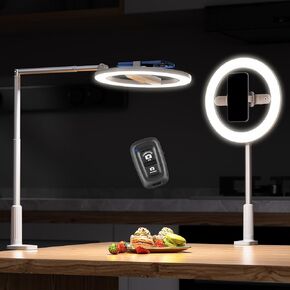 Overhead Phone Mount with Ring Light, 10" Selfie Ring Light with Stand and Phone Holder, Overhead Tripod for Content Creators, TikTok, YouTube, Zoom Video Recording & Filming
KWD 8
Overhead Phone Mount with Ring Light, 10" Selfie Ring Light with Stand and Phone Holder, Overhead Tripod for Content Creators, TikTok, YouTube, Zoom Video Recording & Filming
KWD 8
 -30%
Selfie Ring LED Light for iPhone Picture,Magnetic Phone Light Camera Laptop Photography Lighting,Desk Ringlight Tripod Stand Video Record Streaming Vlog Makeup,Tiktok Content Creators Essentials Clip
KWD 3.500
-30%
Selfie Ring LED Light for iPhone Picture,Magnetic Phone Light Camera Laptop Photography Lighting,Desk Ringlight Tripod Stand Video Record Streaming Vlog Makeup,Tiktok Content Creators Essentials Clip
KWD 3.500




