- Shopping, made easy.
- /
- Get the app!
Please check the compatible model and compare the sample pictures, make sure this is the correct Cooling Fans you need! Please contact us if you have any issue!
*Parameter: DC 5V 0.5A.
*Package Include: 1* CPU Fan 1* GPU Fan,
*Compatible Models: LAOKOEN for HP OMEN 16-ek 15-en 15-ek000 15-en000 GTX1650Ti Series DC5V Fan
15-en0004nt 15-en0008nv 15-en0019ur 15-en0003np 15-en0501ax ,
15-en0001nq 15-en0501ax 15-en0001ns 15-en0261ng 15-en0001LA ,
15-en0001ns 15-en0001nx 15-en0034ax 15-en0029nw 15-en0001nx ,
15-ek0015tx 15-ek0018tx 15-ek0019tx 15-ek0045tx 15-ek0059tx ,
15-ek0017tx 15-ek0109tx 15-ek0112tx 15-ek0012la 15-ek0105tx 15-ek0110nd ,
TPN-Q236 TPN-Q238 Laptop P/N:M04217-001 M04218-001 ND85C26-19J24 ND85C27-19J25 DC5V 0.5A Fan,
(NOT for RTX2060 RTX3060 RTX3070 GTX1660Ti RTX Series graphics card Series laptop).
*Applicable scenarios: Solve the error, abnormal noise, and high temperature of your laptop fan, so that your laptop fan can operate normally again!
*Special attention:
1.Before replacing the laptop fan, remember to shut down the laptop, remove the plug of the external battery or internal battery of the laptop, and then press the switch button several times to release the static electricity and surplus electricity of the motherboard, so as to avoid damage to the motherboard caused by static electricity.In addition, please be sure to pay attention to the direction of the fan plug, do not plug the anti-fan plug, so as to avoid burning the fan.
2.Please pay attention to check whether the voltage of your laptop CPU&GPU fan is consistent with our product description fan voltage, because the same model of computer may have different voltage notebook cooling fans.
3.Disassembly is risky, and installation needs to be cautious.If you can't install it yourself, it's best to ask a professional to help install it. You can also find the installation tutorial on the Internet for reference
.
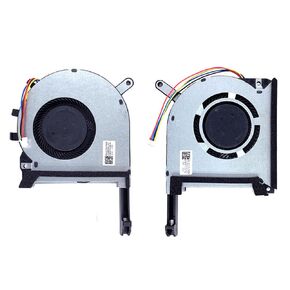 New Replacement Cooling Fans for ASUS TUF Gaming(2020) FX505D FX505DT FA506 FX506 FX506LU FX706 FX95DU FX506L FX505DD FX505 FX705G FX506Li FX705DU FX705DT FA506IV FA506IU FX706 FA706 Laptop Fan
KWD 9
New Replacement Cooling Fans for ASUS TUF Gaming(2020) FX505D FX505DT FA506 FX506 FX506LU FX706 FX95DU FX506L FX505DD FX505 FX705G FX506Li FX705DU FX705DT FA506IV FA506IU FX706 FA706 Laptop Fan
KWD 9
 New Replacement Cooling Fans for Acer Nitro 5 AN515-55 AN515-45 AN517-52 AN517-41 AN515-56 AN515-57 AN515-57-55RY AN515-55-50V2 AN515-55-72ST AN515-55-75BM AN515-55-59TA AN515-45-R7WA N20C1 Laptop
KWD 16.500
New Replacement Cooling Fans for Acer Nitro 5 AN515-55 AN515-45 AN517-52 AN517-41 AN515-56 AN515-57 AN515-57-55RY AN515-55-50V2 AN515-55-72ST AN515-55-75BM AN515-55-59TA AN515-45-R7WA N20C1 Laptop
KWD 16.500
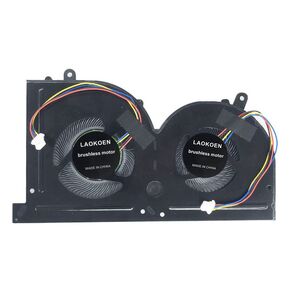 New Replacement Cooling Fans for MSI GS63 GS63VR GS73 GS73VR GS62 GS72 MS-17B1 MS-17B2 MS-16K2 MS-16K3 MS-16K4 MS-16K5 Stealth Pro Series GPU Cooling Fan BS5005HS-U2L1 DC 5V (4-Pin 4-Wire)
KWD 9
New Replacement Cooling Fans for MSI GS63 GS63VR GS73 GS73VR GS62 GS72 MS-17B1 MS-17B2 MS-16K2 MS-16K3 MS-16K4 MS-16K5 Stealth Pro Series GPU Cooling Fan BS5005HS-U2L1 DC 5V (4-Pin 4-Wire)
KWD 9
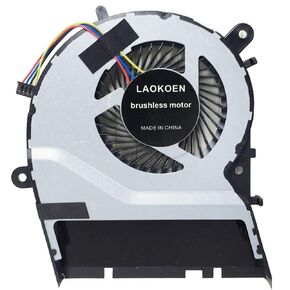 New Replacement Cooling Fans for ASUS VM510L VM590L R556L R557L W419L W519L R556L X555L X555LD A555L K555L F555L X455L FL5800L B5500 FL5500L V555L VM590L4210 F454L Series Laptop Fan
KWD 7
New Replacement Cooling Fans for ASUS VM510L VM590L R556L R557L W419L W519L R556L X555L X555LD A555L K555L F555L X455L FL5800L B5500 FL5500L V555L VM590L4210 F454L Series Laptop Fan
KWD 7




