Search

Home / uconsmimo / Cleaning & Protection Equipment
(2 Pack HD Tempered Glass AR Screen Protector for DJI Osmo Pocket 3, With Auto-Align Install Kit,AR Screen+Lens Protector for POCKET 3 Accessories in Kuwait (2 Pack HD Tempered Glass AR Screen Protector for DJI Osmo Pocket 3, With Auto-Align Install Kit,AR Screen+Lens Protector for POCKET 3 Accessories in Kuwait (2 Pack HD Tempered Glass AR Screen Protector for DJI Osmo Pocket 3, With Auto-Align Install Kit,AR Screen+Lens Protector for POCKET 3 Accessories in Kuwait (2 Pack HD Tempered Glass AR Screen Protector for DJI Osmo Pocket 3, With Auto-Align Install Kit,AR Screen+Lens Protector for POCKET 3 Accessories in Kuwait (2 Pack HD Tempered Glass AR Screen Protector for DJI Osmo Pocket 3, With Auto-Align Install Kit,AR Screen+Lens Protector for POCKET 3 Accessories in Kuwait (2 Pack HD Tempered Glass AR Screen Protector for DJI Osmo Pocket 3, With Auto-Align Install Kit,AR Screen+Lens Protector for POCKET 3 Accessories in Kuwait (2 Pack HD Tempered Glass AR Screen Protector for DJI Osmo Pocket 3, With Auto-Align Install Kit,AR Screen+Lens Protector for POCKET 3 Accessories in Kuwait

(2 Pack HD Tempered Glass AR Screen Protector for DJI Osmo Pocket 3, With Auto-Align Install Kit,AR Screen+Lens Protector for POCKET 3 Accessories

KWD 5

Brand
uconsmimo
Weight
50 g
1 +

Special Features

  • 【Effective Protection】 Protect your Pocket 3 screen from accidental scratches and collisions, with a very smooth coating on its surface that can reduce fingerprints caused by sweat and grease to some extent.
  • 【Anti-reflection Feature】 The AR Tempered Glass Film can effectively reduce the reflection of light on the screen surface, which helps to show more realistic colors on your pocket 3.
  • 【Effortless Installation】 The installer has a small notch,which aligns the protector to the notch on the bottom right hand side of your screen.Just clean the dust, remove the inner cover and lay the installer on top of the screen with the notch aligned. Press down, and then squeeze out the bubbles and slowly remove the blue installer.Very easy and soon your screen get protected.
  • 【Pay Attention】 When used with filters, the lens protector may be unstable. To avoid unstable adsorption or detachment of the filter, it is recommended not to use both the filter and lens protector at the same time.
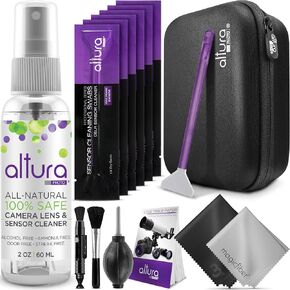
  • 【Package Content】 (2 Pack) AR Screen+Lens Protector and cleaning tools.

Description

(2 Pack) Tempered Glass AR Screen Protector+Lens Protector for DJI Osmo Pocket 3, With Auto-Align Install Kit
Related Items


{"error":"Error","cart_limit":"You have too many items in your cart.","prod_limit":"You cannot add any more of this item"}

