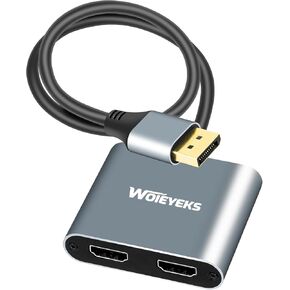
6 Ft DisplayPort to Dual HDMI Splitter Adapter 4K@60Hz for Dual Monitors Extended Display,Plug and Play Without Additional HDMi Cables,Display Port to 2 HDMI Out for Desktop, Laptop,Extend Display
6ft DisplayPort to Dual HDMI Adapter No external HDMI cable is required. Direct connection is ready for use, stable signal and high compatibility. It is a converter that converts DP1.2 port to dual HDMI2.0/1.4, and can connect two external displays, supporting DisplayPort single stream transmission (SST) mode and multi-stream transmission (MST) mode. Note: Cannot be used with hub/dock/KVM, Mac does not support extending two different displays.Before purchasing, Please make sure your computer with DP port before purchase
Dual HDMI display port monitors can be added to your PC, laptop or desktop, NVIDIA, AMD graphics card. The resolution of a single HDMI screen is up to 4K@60Hz, and the resolution of a dual HDMI screen is up to 4K@30Hz. And it is backward compatible with 2K/1080P@60Hz resolution.To achieve this resolution, both of your displays need to support the same resolution. And the graphics card needs to support bandwidth above 18Gbps; Support UHD 4k@60Hz (RGB and YCbCr 4:4:4) Note:It is not bi-directional, and only supports one-way DisplayPort source signals to HDMI displays
Plug and Play, no need to install drivers, easy to set up dual monitors. Step 1: Connect 2 HDMI cables to the display. Step 2: A Micro USB cable must be connected to power the splitter. (Note: Connecting the USB power cable requires a current greater than 1 A, some computer USBs cannot provide sufficient current for the adapter, please connect to a power adapter!!) Step 3: Plug the DP male into the signal source port. Step 4: Press the power switch to complete. Note: Computers with integrated GPU can only support mirror mode or can only extend one display
High-quality aluminum alloy shell, stable heat dissipation, high-quality shielded wire facilitates more stable signal transmission, 6 ft long cable adds more flexibility for video extension, can be placed anywhere without hanging on the equipment to cause risks
Important: The USB power cable must be connected to ensure the adapter works properly. The USB power cable is included. It is not recommended to connect to the USB port of a laptop or PC. The current may not be enough to cause a black screen or flickering screen. It is recommended to connect to an external power adapter! ! ! Minimum 5V/1A is required. If you have any questions, we will help you within 24 hours
【Important Tip】1.The MicroUSB cable must be connected before use,And the minimum current required is DC 5V/1A.2.Not work with any Hub / Docking / KVM And other devices, only suitable for Display port graphics cards or laptops.3.Not work for mac OS. On macOS and some PC with integrated graphic cards Only single screen display.4.The graphics card of the DP device must support a bandwidth of over 18Gbps; If it cannot be displayed, please update the graphics card driver to the latest version


 -9%
4K 60Hz DisplayPort to Dual HDMI Splitter Cable Adapter for Dual Monitors Extended Display.SST/MST Specification Display Port Extend 1 in 2 HDMI Out for Desktop,Laptop,NVIDIA, AMD Graphics Card
KWD 14.500
-9%
4K 60Hz DisplayPort to Dual HDMI Splitter Cable Adapter for Dual Monitors Extended Display.SST/MST Specification Display Port Extend 1 in 2 HDMI Out for Desktop,Laptop,NVIDIA, AMD Graphics Card
KWD 14.500
 -11%
Android 14 TV Box 2025 Android Box 4GB RAM 64GB ROM for Smart TV 1000M Ethernet R69 Plus 8K TV Box 4K HDR10+ H728 Octa-core WIFI6 2.4G 5.8G Dual WiFi BT5.0 USB 3.0 with Mini Wireless Keyboard
KWD 24.500
-11%
Android 14 TV Box 2025 Android Box 4GB RAM 64GB ROM for Smart TV 1000M Ethernet R69 Plus 8K TV Box 4K HDR10+ H728 Octa-core WIFI6 2.4G 5.8G Dual WiFi BT5.0 USB 3.0 with Mini Wireless Keyboard
KWD 24.500
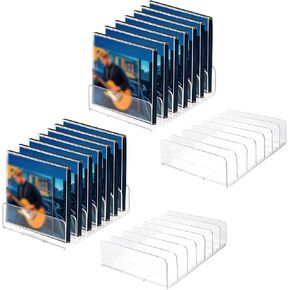 Plus tard 4Pcs Clear Acrylic CD Holder, CD Storage Stand DVD Display Shelf Organizers Holds Up to 14 Standard CD Cases for Media and Video Game Cases Organization Rack
KWD 5.500
Plus tard 4Pcs Clear Acrylic CD Holder, CD Storage Stand DVD Display Shelf Organizers Holds Up to 14 Standard CD Cases for Media and Video Game Cases Organization Rack
KWD 5.500
 -14%
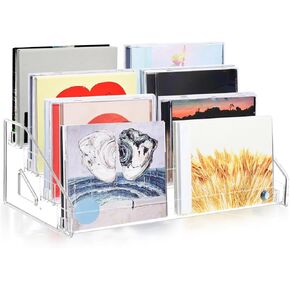
4 Tiers CD Holder, 12" CD Storage Rack No Tool Needed Assembly Holds up to 24 Standard CD Cases clear Risers Display Stands for Trading Cards Business Cards and Stickers
KWD 3
-14%
4 Tiers CD Holder, 12" CD Storage Rack No Tool Needed Assembly Holds up to 24 Standard CD Cases clear Risers Display Stands for Trading Cards Business Cards and Stickers
KWD 3




