- Shopping, made easy.
- /
- Get the app!
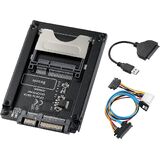
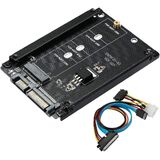
Precautions for using the product
1. Be sure to back up the data on the hard disk before use. Because reorganizing the JBOD will erase all data on the hard drive.
2. To use, 2 M.2 SATA SSDs must be inserted into the riser card at the same time. SSDs that do not support PCI-E and NVME protocols. (Please read the product manual carefully for the installation method)
3. The highest speed of the adapter card under SATA3.0 is 500-550m/s. When connected to SATA2.0, the speed can only run at 200-260m/s.
4. The riser card is designed to combine 2 hard drives into a JBOD and merge them into one hard drive. This increases the hard disk capacity.
5. If the CD-ROM cannot be read without the driver, please contact us.
Packing Accessories
SATA to Dual M.2 Riser Card X1
CD X1
SATA Cable X1
User Manual X1
Screw X3
 -14%
M.2 NVME SSD Convert Adapter Card,12+16pin to M.2 NGFF M-Key SSD Convert Card,NVME AHCI SSD Upgrade Adapter for M a c Notebook (2013-2017 Year)
KWD 3
-14%
M.2 NVME SSD Convert Adapter Card,12+16pin to M.2 NGFF M-Key SSD Convert Card,NVME AHCI SSD Upgrade Adapter for M a c Notebook (2013-2017 Year)
KWD 3
 -10%
CFexpress Type B Magnetic Card Reader with PD3.0, 10Gbps USB 3.2 Gen 2, CF Express Reader for Type-B, Plug and Play, Magsafe CFexpress Type B Adapter for Professional Filmmakers, Photographers
KWD 18.500
-10%
CFexpress Type B Magnetic Card Reader with PD3.0, 10Gbps USB 3.2 Gen 2, CF Express Reader for Type-B, Plug and Play, Magsafe CFexpress Type B Adapter for Professional Filmmakers, Photographers
KWD 18.500
 -23%
Anker 575 USB-C Docking Station (13-in-1) with USB 3.0 SD Card Reader
KWD 64.500
-23%
Anker 575 USB-C Docking Station (13-in-1) with USB 3.0 SD Card Reader
KWD 64.500
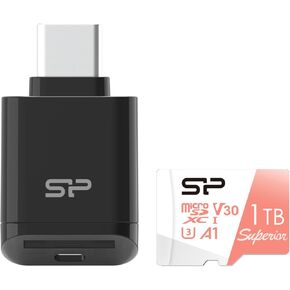 Silicon Power Micro SDXC UHS-I U3 1TB Memory Card Bundle with USB C Card Reader SPUAD1TC200
KWD 33
Silicon Power Micro SDXC UHS-I U3 1TB Memory Card Bundle with USB C Card Reader SPUAD1TC200
KWD 33