- Shopping, made easy.
- /
- Get the app!
Features:
A:HDMI 8K 2In 1Out Switcher
You are allowed to connect from two HDMI Sources,Like PS5,Xbox x,HDMI Laptops to your HDMI TVs or HDMI Monitors.You need to plug your own HDMI Cable from our HDMI Switch to your HDMI Source Devices or your HDMI TVs.(Our package do not contain HDMI Cables)
Conection Steps:
(1):Connect the Switcher's HDMI Source 1 and HDMI Source 2 to your hdmi device,such as PS5,Xbox x,Set-top Box,PC etc.
(2):Connect the Switcher's “HDMI Display” to your HDMI TVs or HDMI Displays.
(3):Connect the USB-C Cable to your USB devices for Power.
(4):Non Auto-Switching
(5):You are able to output 4K@120Hz or 8K@60Hz in your HDMI 2.1 TVs.
B:Switch Mode(Support Remote Control)
For this HD 8K 2x1 Switch,there have two switch Modes/Methods
(1):Press”Select”Button in the Switcher to switch between your two HDMI Source Devices.
(2):Press the “Power Symbol”in the remote control to turn on the Remote Control,then Press”1”and”2” in the controller to switch between your two hdmi source devices. When switching, please align the “IR” position of the switch.
3.0 Important Notes:
1.In case that insufficient power supply cause Black screen or no picture on your screen,please connect the equipped USB-C cable come with the Switcher to power it.
2.This switch can not work from one HDMI Source Devices to two HDMI TVs,it can only work from two HDMI Source Devices to One HDMI Display.It is a Directional Switcher.
3.If you would like to output 4K@120Hz or 8K@60Hz via our HDMI Switcher/Splitter to your HDMI TVs or Displays,please make sure that your hdmi source device,HDMI Cable and HDMI Displays all support 8K@60Hz or 4K@120Hz
4.When using the remote control to switch, you are requested to align the remote control at the "IR" position of the switch. 5.The length of the HDMI cables connected to both ends of the switcher should not exceed 3 meters respectively.
 YIWENTEC HDMI 2.1 Ultra HD 8K High Speed 48Gbps HDR10 3D Directional Switch Only 4in 1out 8K@60Hz 4K@120Hz HDCP2.3 Converter with IR Remote Switch Compatible with Xbox x PS5
KWD 9
YIWENTEC HDMI 2.1 Ultra HD 8K High Speed 48Gbps HDR10 3D Directional Switch Only 4in 1out 8K@60Hz 4K@120Hz HDCP2.3 Converter with IR Remote Switch Compatible with Xbox x PS5
KWD 9
 -8%
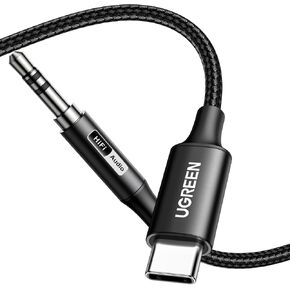
UGREEN Aux to USB C Type C to 3.5mm Audio Adapter Hi-Res 32bit/384KHz Stereo Cord Headphone Male Car Auxiliary Cable Compatible with iPhone 16 15 Pro Max Plus, Galaxy S25 S24 Ultra iPad Pixel 9, 3.3FT
KWD 5.500
-8%
UGREEN Aux to USB C Type C to 3.5mm Audio Adapter Hi-Res 32bit/384KHz Stereo Cord Headphone Male Car Auxiliary Cable Compatible with iPhone 16 15 Pro Max Plus, Galaxy S25 S24 Ultra iPad Pixel 9, 3.3FT
KWD 5.500
 -11%
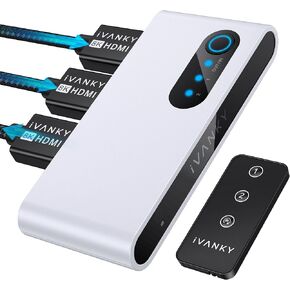
IVANKY 8K HDMI Switch 4K@120Hz Bi-Directional 8K HDMI 2.1 Switch with Remote 2 in 1 Out, 1 in 2 Out (1 Display at a Time) HDR 3D 8K@60Hz for Xbox Series, PS5/PS4/PS3, Roku, Apple TV, PC, Fire Stick
KWD 8.500
-11%
IVANKY 8K HDMI Switch 4K@120Hz Bi-Directional 8K HDMI 2.1 Switch with Remote 2 in 1 Out, 1 in 2 Out (1 Display at a Time) HDR 3D 8K@60Hz for Xbox Series, PS5/PS4/PS3, Roku, Apple TV, PC, Fire Stick
KWD 8.500
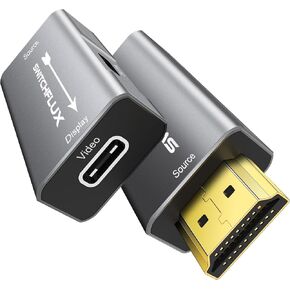 HDMI to USB C Adapter | 4K@60Hz HDMI Source to USB-C Display Converter for XR/AR Glasses(XREAL One,Air 2 Pro,VITURE Pro,RayNeo Air 2s,Rokid),Portable Monitors,Laptop,Switch,PS5/4,Xbox
KWD 8.500
HDMI to USB C Adapter | 4K@60Hz HDMI Source to USB-C Display Converter for XR/AR Glasses(XREAL One,Air 2 Pro,VITURE Pro,RayNeo Air 2s,Rokid),Portable Monitors,Laptop,Switch,PS5/4,Xbox
KWD 8.500




