- Shopping, made easy.
- /
- Get the app!
Operating Manual
1)Connect the computer to the USB3.1 type-c port of the product
2)Use the HDMI head to connect the HDMI master block of the product to projector, TV, monitor etc.
3)Used to connect MicroSD/SD memory card. Insert and read first
Simultaneous reading is not supported.
4)Connect USB30 port to USB devices
Matters Needing Attention
Since the current output of the new Macbook is about 1. 5A, when the load exceeds 1.5A, the computer will start the self-protection function. It will prompt: USB is power-consuming and disabled, so unplug the converter (and close the disable icon or reboot) and re-insert it.
 USB C Docking Station, MacBook HDMI Adapter 13-in-1 UPGROW Type-C Hub with 4K HDMI,VGA,USB 3.0&2.0, USB C/F, PD Charger, SD/TF, RJ45, Aux, USB C Ethernet Adapter Splitter for Most Type C Laptops
KWD 28.500
USB C Docking Station, MacBook HDMI Adapter 13-in-1 UPGROW Type-C Hub with 4K HDMI,VGA,USB 3.0&2.0, USB C/F, PD Charger, SD/TF, RJ45, Aux, USB C Ethernet Adapter Splitter for Most Type C Laptops
KWD 28.500
 USB C Hub for MacBook, PowerExpand Direct 7-in-2 USB C Adapter Compatible with Thunderbolt 3 USB C Port, 100W Power Delivery, 4K HDMI, USB C and 2 USB A Data Ports, SD and microSD Card Reader
KWD 4.500
USB C Hub for MacBook, PowerExpand Direct 7-in-2 USB C Adapter Compatible with Thunderbolt 3 USB C Port, 100W Power Delivery, 4K HDMI, USB C and 2 USB A Data Ports, SD and microSD Card Reader
KWD 4.500
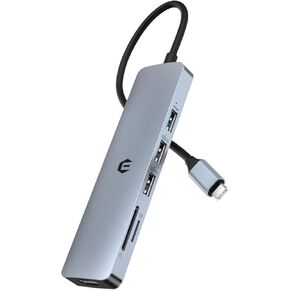 USB C Hub, 6 Ports Multiport Hub Adapter with 4K HDMI, USB 3.0/2.0 Ports, SD/TF Card Reader, Dual Display USB C Adapter Dongle for USB C Laptop and Tablet, ohter Devices
KWD 3
USB C Hub, 6 Ports Multiport Hub Adapter with 4K HDMI, USB 3.0/2.0 Ports, SD/TF Card Reader, Dual Display USB C Adapter Dongle for USB C Laptop and Tablet, ohter Devices
KWD 3
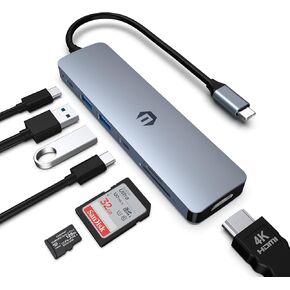 USB C HUB, 7 in 1 Hub Adapter, HDMI Output, 100W Power Delivery, USB C 3.0, Dual USB 3.0 Ports, SD and Micro SD Card Reader, Ideal for Dell XPS/HP/Surface Laptops and Other Type C Devices
KWD 3
USB C HUB, 7 in 1 Hub Adapter, HDMI Output, 100W Power Delivery, USB C 3.0, Dual USB 3.0 Ports, SD and Micro SD Card Reader, Ideal for Dell XPS/HP/Surface Laptops and Other Type C Devices
KWD 3




