[Soft OLED] for iPhone 12 PRO MAX Screen Replacement with Front Speaker Proximity Sensor 12PROMAX 3D Touch Display Digitizer Assembly 6.7" Complete Repair Fix Tool Kit A2342 A2410 A2411 A2412
【Compatible】The SOFT OLED (not LCD) screen replacement is only compatible with iPhone 12PROMAX (Models: A2342 A2410 A2411 A2412)6.7" . NOT for other models. You need to confirm your mobile phone model before purchasing, and you can check the model through the mobile phone settings. you can go to mobile phone settings - general - about - mobile model, Check your mobile phone model.
【SOFT OLED】The SOFT OLED screen is different from other traditional screens. First of all, it has vivid visual effects and can bring a better visual experience. Secondly, the SOFT OLED screen has low power consumption, which can extend the battery life of the device. Then, due to the use of flexible substrates, SOFT OLED screens are more resistant to drops than other screens. Finally, when we touch the SOFT OLED screen with our hands, it will feel very soft, same as the original.
【About Face ID Funtion】For users security, FACE ID function only work with your original earspeaker of your phone, so if you replace the screen, you can not use the Face ID function. If you needs Face ID, you should transfer your original earspeaker from the old earpiece part to the new one above to keep Face ID function.
【High Quality】For iPhone 12 PROMAX SOFT OLED screens replacement include Pre-installed earpiece speaker, proximity sensor. And it use sturdy frames, strong compression resistance, and high stability IC chips, the flex cable is made of durable and high quality materials, which are not easy to break during installation. In addition, if you have any question during using or buying, please feel free to contact us.
【Easy to Use】Before installing the screen, please turn off the mobile phone, check if the flex cable interface is properly connected and clean any debris on the interface. First attach the screen's flex cable, then attach the earpiece's flex cable to avoid mistake. If the screen does not working after install, try unplugging and reconnecting the flex cables to address the issue. Tips: Use a hair dryer to soften the glue and make it easier to remove the screen.


 -7%
for iPhone 11 Loud Speaker Buzzer Ringer Connector Flex Cable Module Replacement for iPhone Xr Loudspeaker Sound Audio Assembly Part Complete Repair Tool Kit A2111 A2223 A2221 A1984 A2105 A2106 A2108
KWD 7
-7%
for iPhone 11 Loud Speaker Buzzer Ringer Connector Flex Cable Module Replacement for iPhone Xr Loudspeaker Sound Audio Assembly Part Complete Repair Tool Kit A2111 A2223 A2221 A1984 A2105 A2106 A2108
KWD 7
 -3%
for iPhone 7 Plus Screen Replacement with Home Button 5.5inch Black, 7Plus LCD Display Digitizer Full Assembly Repair Kit with Front Camera Earpiece Speaker Sensor, Fix Tools A1661 A1784 A1785
KWD 15
-3%
for iPhone 7 Plus Screen Replacement with Home Button 5.5inch Black, 7Plus LCD Display Digitizer Full Assembly Repair Kit with Front Camera Earpiece Speaker Sensor, Fix Tools A1661 A1784 A1785
KWD 15
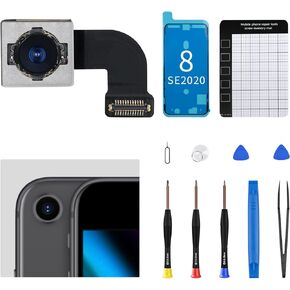 for iPhone 8 Main Rear Back Camera Replacement OEM for iPhone SE 2020 HD Video HDR Photo New 12MP Lens Module 4K Video Cable Digital Zoom Image Repair Assemble Fix Tool Kit A1863 A1905 A1906
KWD 7
for iPhone 8 Main Rear Back Camera Replacement OEM for iPhone SE 2020 HD Video HDR Photo New 12MP Lens Module 4K Video Cable Digital Zoom Image Repair Assemble Fix Tool Kit A1863 A1905 A1906
KWD 7
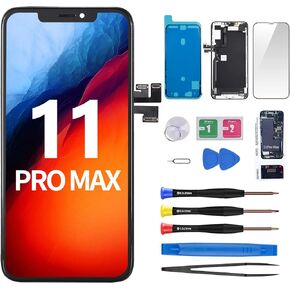 -20%
for iPhone 11 Pro Max Screen Replacement with Ear Speaker Proximity Sensor 6.5" Kit 11promax LCD Display Digitizer 3D Touch Full Assembly Earpiece Repair Front Glass Fix Tool A2161 A2220 A2218
KWD 18.500
-20%
for iPhone 11 Pro Max Screen Replacement with Ear Speaker Proximity Sensor 6.5" Kit 11promax LCD Display Digitizer 3D Touch Full Assembly Earpiece Repair Front Glass Fix Tool A2161 A2220 A2218
KWD 18.500


![[Soft OLED] for iPhone 12 PRO MAX Screen Replacement with Front Speaker Proximity Sensor 12PROMAX 3D Touch Display Digitizer Assembly 6.7" Complete Repair Fix Tool Kit A2342 A2410 A2411 A2412 in Kuwait](https://cdn1.tilga.com/md/prod/3/4400/133112651.36740.jpg)
![[Soft OLED] for iPhone 12 PRO MAX Screen Replacement with Front Speaker Proximity Sensor 12PROMAX 3D Touch Display Digitizer Assembly 6.7" Complete Repair Fix Tool Kit A2342 A2410 A2411 A2412 in Kuwait](https://cdn1.tilga.com/md/prod/3/4400/133112652.65029.jpg)
![[Soft OLED] for iPhone 12 PRO MAX Screen Replacement with Front Speaker Proximity Sensor 12PROMAX 3D Touch Display Digitizer Assembly 6.7" Complete Repair Fix Tool Kit A2342 A2410 A2411 A2412 in Kuwait](https://cdn1.tilga.com/md/prod/3/4400/133112653.25630.jpg)
![[Soft OLED] for iPhone 12 PRO MAX Screen Replacement with Front Speaker Proximity Sensor 12PROMAX 3D Touch Display Digitizer Assembly 6.7" Complete Repair Fix Tool Kit A2342 A2410 A2411 A2412 in Kuwait](https://cdn1.tilga.com/md/prod/3/4400/133112654.26395.jpg)
![[Soft OLED] for iPhone 12 PRO MAX Screen Replacement with Front Speaker Proximity Sensor 12PROMAX 3D Touch Display Digitizer Assembly 6.7" Complete Repair Fix Tool Kit A2342 A2410 A2411 A2412 in Kuwait](https://cdn1.tilga.com/md/prod/3/4400/133112655.35822.jpg)
![[Soft OLED] for iPhone 12 PRO MAX Screen Replacement with Front Speaker Proximity Sensor 12PROMAX 3D Touch Display Digitizer Assembly 6.7" Complete Repair Fix Tool Kit A2342 A2410 A2411 A2412 in Kuwait](https://cdn1.tilga.com/md/prod/3/4400/133112656.30454.jpg)