The USB to RS232 adapter connects devices with COM ports to the computer's USB port. On Windows, additional COM ports are automatically displayed in Device Manager.
Compatible with Windows 7, 8, 10, Compatible with Vista, Compatible with XP 2000, Compatible with macOS X 10.6.
Compatible with modems, printers, ISDN terminal adapters, digital cameras, label printers, mobile phones, barcode scanners, and requiring RS232 ports,
Easy to install, easily plug the cable into the USB port of the computer and the 9-pin RS232 socket of the device. No additional software or drivers are required.
After connection, a new COM port (such as USB /Serial CH340 COM5) will appear in the Device Manager. This COM port number must be configured in the software.

 -15%
Togconn USB C to HDMI VGA Adapter,Type C to Dual VGA HDMI Adapter Compatible with MacBook Pro, iPad Pro/Air, Dell XPS, Chromebook, Surface Pro
KWD 5.500
-15%
Togconn USB C to HDMI VGA Adapter,Type C to Dual VGA HDMI Adapter Compatible with MacBook Pro, iPad Pro/Air, Dell XPS, Chromebook, Surface Pro
KWD 5.500
 eMagTech 22 Pin 2.5'' SATA to ESATA Data Hard Drive with USB Power Adapter Cable for 2.5 SATA HDD SSD BLU-RAY DVD CD-ROM DVD-ROM CD-RW DVD-RW DVD+RW Combo Devices
KWD 4.500
eMagTech 22 Pin 2.5'' SATA to ESATA Data Hard Drive with USB Power Adapter Cable for 2.5 SATA HDD SSD BLU-RAY DVD CD-ROM DVD-ROM CD-RW DVD-RW DVD+RW Combo Devices
KWD 4.500
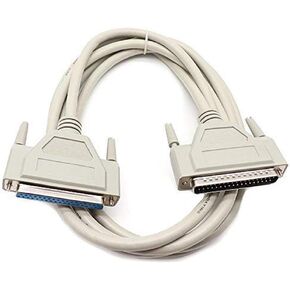 DB37 Serial Extension Cable 37 Pin 3m/10ft Male to Female for PC Printer Network Modem
KWD 3.500
DB37 Serial Extension Cable 37 Pin 3m/10ft Male to Female for PC Printer Network Modem
KWD 3.500
 eMagTech ARGB Controller 5V 3 Pin SATA Power Supply Light Stripe Controller Cable for Chassis Fan Tube Lamp Plate Cooling Heat Sink Cooling Radiator
KWD 4
eMagTech ARGB Controller 5V 3 Pin SATA Power Supply Light Stripe Controller Cable for Chassis Fan Tube Lamp Plate Cooling Heat Sink Cooling Radiator
KWD 4




