KVM switch 1 monitor 2 computers HDMI edid 4k 60hz Detailed resolution: HDMI2.0 HDMI kVM switch 1 monitor 2 computers 144Hz Maximum supported resolution 4K@60Hz 2 computers and 1 monitor, 3440x1440@60Hz , 3440x1440@75Hz , 3440x1440@100Hz , 2560x1440@100Hz , 2560x1440@75Hz , 2560x1440@75Hz 2560x1440 40@40 @120Hz, 2560x1440@1440 @144Hz, 5120x1440@60Hz 3840* 2160@60Hz , 3840x2160@30hz , 3840x1600@60Hz , 3840x1600@75Hz , 3440 x 1600@75Hz , 3840 x 1080@120Hz 1080P 240Hz. The final resolution is also affected by the graphics card, monitor, cable, and adapter, and can work together;
Kvm switch 1 monitor 2 computers hdmi edid 4k 60hz compatibility: kvm switch 1 monitor 2 computers hdmi support most major operating systems, such as Windows, Linux, Mac, etc; It also supports switching between devices without a keyboard and mouse, such as DVR and NVR; Supports network cameras, speakers/headphones, and microphones;
KVM switch 1 monitor 2 computers HDMI edid 4k 60hz Detailed resolution: HDMI2.0 HDMI kVM switch 1 monitor 2 computers 144Hz Maximum supported resolution 4K@60Hz 2 computers and 1 monitor, 3440x1440@60Hz , 3440x1440@75Hz , 3440x1440@100Hz , 2560x1440@100Hz , 2560x1440@75Hz , 2560x1440@75Hz 2560x1440 40@40 @120Hz, 2560x1440@1440 @144Hz, 5120x1440@60Hz 3840* 2160@60Hz , 3840x2160@30hz , 3840x1600@60Hz , 3840x1600@75Hz , 3440 x 1600@75Hz , 3840 x 1080@120Hz 1080P 240Hz. The final resolution is also affected by the graphics card, monitor, cable, and adapter, and can work together;
Kvm switch 1 monitor 2 computers hdmi edid 4k 60hz switch mode: kvm switch hdmi edid supports two switching methods to meet different needs, including buttons and wired remote control; After the first setup, it only takes a few seconds to switch;
Note: There is no HDMI cable in the HDMI KVM switch. HDMI to DP or adapter that supports power supply; This KVM switch HDMI can support EDID simulation, and the HDMI switch 2-in-1 output can support adapters, adapter cables, and docking stations
Kvm Switch 1 monitor 2 computers hdmi edid 4k 60hz: When your computer is dp output and you want a Displayport kvm switch edid clone, you can use DP TO HDMI cable+kvm switch hdmi edid+4k hdmi 2.0 cable for monitoring, and their display port inputs will be edid emulator
Kvm Switch 1 monitor 2 computers hdmi edid 4k 60hz: kvm hdmi edid is very suitable for gaming kvm swtich, and the edid simulator makes your gaming smooth and won't change. It will not adjust the desktop size. When your computer has lightning output and you want a lightning switch, edid clone, you can use a C-type to HDMI cable+kvm switch, hdmi edid+4k hdmi 2.0 cable for monitoring, and their lightning input will be an edid Emulator.
Kvm Switch 1 monitor 2 computers hdmi edid 4k 60hz: When your computer is dp output and you want a Displayport kvm switch edid clone, you can use DP TO HDMI cable+kvm switch hdmi edid+4k hdmi 2.0 cable for monitoring, and their display port inputs will be edid emulator


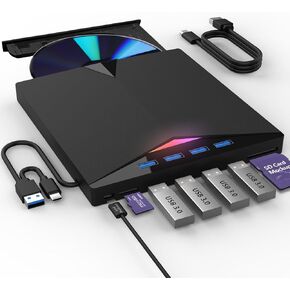 External Compatible Blur ay Drive Player Read/Write BD DVD CD Compatible Blu ray Burner USB 3.0 Type-C/Windows/Mac OS Laptop
KWD 20.500
External Compatible Blur ay Drive Player Read/Write BD DVD CD Compatible Blu ray Burner USB 3.0 Type-C/Windows/Mac OS Laptop
KWD 20.500
 -29%
500 Pcs Micro Tiny Screws, M1.2/M1.4/M2.0 Small Screws Assortment Kit with Screwdriver, Metal Replacement Screw for Mobile Phone Laptop Glasses Watch Computer Camera Repair
KWD 2.500
-29%
500 Pcs Micro Tiny Screws, M1.2/M1.4/M2.0 Small Screws Assortment Kit with Screwdriver, Metal Replacement Screw for Mobile Phone Laptop Glasses Watch Computer Camera Repair
KWD 2.500
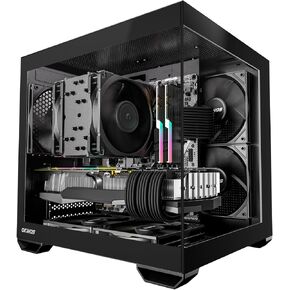 MATX PC Case, 5 x 120mm Case Fans (Non-PWM) Pre-Installed, Type-C Port, 270° Panoramic Tempered Glass Panel, 5-PCIe Slot, 240mm Radiator ONLY for ITX MOBO, Micro ATX Case, Mirage 2
KWD 22
MATX PC Case, 5 x 120mm Case Fans (Non-PWM) Pre-Installed, Type-C Port, 270° Panoramic Tempered Glass Panel, 5-PCIe Slot, 240mm Radiator ONLY for ITX MOBO, Micro ATX Case, Mirage 2
KWD 22
 2X PCIe Single Cable for Corsair PSUs - Embossing Process PCIe Cables (Dual Connector 6+2Pin) – Black (2 Pack)
KWD 6.500
2X PCIe Single Cable for Corsair PSUs - Embossing Process PCIe Cables (Dual Connector 6+2Pin) – Black (2 Pack)
KWD 6.500




