- Shopping, made easy.
- /
- Get the app!
Specifications:
Battery Type: Li-ion
Voltage: 7.6V
Capacity: 47wh/4-Cell
Condition: 100% New from Manufacturer, Grade A Cell
Replace Part Number: GJKNX, GD1JP, 0GD1JP, DY9NT, 0DY9NT, 5YHR4, 451-BBZG
Including: Battery, Manual, Screw tools
Attention: Please note that this battery does not contain the cable, you will need to keep the original cable.
Please open the back cover of your laptop to check the original battery size and capacity before placing an order.
Compatible Laptop/Tablet Models:
Dell Latitude 5480 Series, Dell Latitude 5580 Series (only with M.2 storage),
Dell Latitude 5280 Series, Dell Latitude 5288 Series,
Dell Latitude 5488 Series, Dell Latitude 5490 Series,
Dell Latitude 5491 5495 Series, Dell Latitude 5590 5591 Series,
Dell Latitude E5280 Series, Dell Latitude E5288 Series,
Dell Latitude E5480 Series, Dell Latitude E5490 Series,
Dell Latitude E5491 Series, Dell Latitude E5580 Series,
Dell Latitude E5590 Series, Dell Latitude E5591 Series,
Dell Precision 15 3520 Series, Dell Precision 15 3530 Series
Dell P72G001 P72G002 P72G003 P60F001 and more.
Check the computer model:
1 Press "Windows + R" to open the Run window.
2 Type "msinfo32" in the empty box and click OK to open System Information.
3 Keep in the "System Summary" section and you will find the "System Model " item in the right pane.
Installing a new battery:
1.You need to turn off your laptop and disconnect the power.
2.Remove the old battery and carefully install the new battery onto the battery compartment and connect the wires of the new battery.
3.Also suggest searching the internet for relevant videos to combine with the above installation steps for details.
Battery Maintenance Tips:
1. New Batteries: When using a new battery, it is best to discharge the battery to 5% and then recharge it to 95%. This way the battery can be fully activated.
2. Don't overuse: Don't always use the battery to 0%, as this may damage the battery or shorten its life. 3.
3. Long-term storage: Store unused batteries fully charged (recharge once a month) and do not store batteries when they are low as this may shorten their life.
4. Charger: Do not replace the laptop adapter. If the original adapter cannot be used due to malfunction or damage, please replace the model to avoid reducing the battery life due to incompatibility.
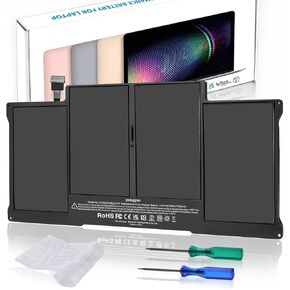 Battery for MacBook Air 13 Inch A1466 (Mid 2012, Mid 2013, Early 2014, Early 2015, 2017) A1369 (Late 2010, Mid 2011) Replacement Battery Model A1496 A1377 A1405 (Upgraded 6.2 Versions)
KWD 27.500
Battery for MacBook Air 13 Inch A1466 (Mid 2012, Mid 2013, Early 2014, Early 2015, 2017) A1369 (Late 2010, Mid 2011) Replacement Battery Model A1496 A1377 A1405 (Upgraded 6.2 Versions)
KWD 27.500
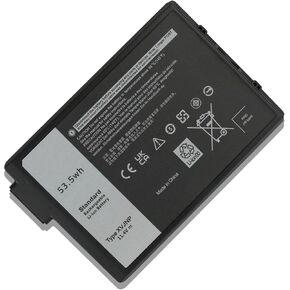 XVJNP 6JRCP 0M0TN3 Battery Replacement for Dell Latitude 5430 7330 Rugged Extreme P148G P148G001 P149G P149G001 Series Laptop 06JRCP M0TN3 KD1CT 451-BCWQ 11.4V 53.5Wh 4457mAh
KWD 20.500
XVJNP 6JRCP 0M0TN3 Battery Replacement for Dell Latitude 5430 7330 Rugged Extreme P148G P148G001 P149G P149G001 Series Laptop 06JRCP M0TN3 KD1CT 451-BCWQ 11.4V 53.5Wh 4457mAh
KWD 20.500
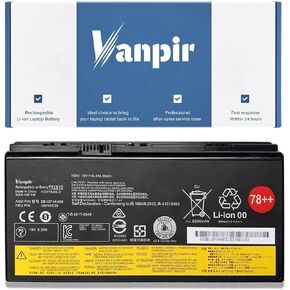 00HW030 Laptop Battery 15V 96Wh 6400mAh 8-Cell Replacement for Lenovo ThinkPad P70 P71 Series Notebook 78++ 78+ SB10F46468 01AV451 4X50K14092 5B10W13950
KWD 29.500
00HW030 Laptop Battery 15V 96Wh 6400mAh 8-Cell Replacement for Lenovo ThinkPad P70 P71 Series Notebook 78++ 78+ SB10F46468 01AV451 4X50K14092 5B10W13950
KWD 29.500
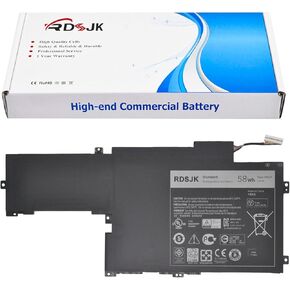 5KG27 Laptop Battery for Dell Inspiron 14 7000 14-7437 Ins14-7000 Ins14HD-1608T Ins14HD-1808T Ins14HD-2608T Inspiron 14HD-1508 14HD-2508 Series 05KG27 09KH5H P42G C4MF8 7.4V 58Wh
KWD 29
5KG27 Laptop Battery for Dell Inspiron 14 7000 14-7437 Ins14-7000 Ins14HD-1608T Ins14HD-1808T Ins14HD-2608T Inspiron 14HD-1508 14HD-2508 Series 05KG27 09KH5H P42G C4MF8 7.4V 58Wh
KWD 29




