⌨️🖱️【YOUR GAME, YOUR RULES】 The AX200 adapter anti-recoil macro revolutionises gaming by negating weapon kickback in shooters. AX200 Improved aim, accuracy, and controlled gamers enjoy consistent performance, enhancing immersion and competitiveness, truly transforming your gaming experience. With AX200's response curve support, adjust your mouse's speed and movement dynamics to perfectly suit your gameplay style.
⌨️🖱️【CREATIVITY DESIGN】 The PC keyboard mouse converter transforms keyboard and mouse inputs into controller signals. Support customize via 'Geekvice' App, you can browse tons of pre-made configurations for different games and adjust parameters like sensitivity and bindings give you an edge in various gaming scenarios. Personalize them easily from your smartphone without having to go out of the game and without loading times.
⌨️🖱️【DESIGNED EXCLUSIVELY FOR PC GAMING】 Designed Exclusively for PC Gaming: The AX200 Keyboard and Mouse Adapter is tailor-made for PC gaming enthusiasts. Excellent for FPS (First Person Shooter), TPS (Third Person Shooter) games from Steam and so on. Not limited to: Apex Legends, COD: Modern Warfar, Destiny2, PUBG.
⌨️🖱️【PLUG AND PLAY】 No need for complicated setup when using on a PC. Easily connect to gaming platforms such as Steam with the X-box device recognition function. (Please read the user manual or watch the operation video before use) If you have any problems during the use, ask us.
⌨️🖱️【WIDELY SUPPORT】 The Joso keyboard and mouse converter are widely compatible with wired keyboards, wired mouse, full-size keyboards, one-handed keyboards, and 2.4G wireless keyboards mouse. (Not for Bluetooth keyboard and mouse)
⌨️🖱️【TIPS FOR USING ADAPTER】 1. To ensure the best gaming experience, we recommend keeping both the 'Geekvice' App and the firmware updated to the latest versions. 2. When using with large power-consuming keyboard and mouse, the adapter needs to be powered through the Type-C port for the keyboard and mouse to work properly. 3. Open a gaming platform such as Steam first and then proceed to connect the AX200.


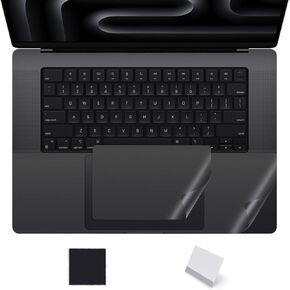 Palm Rest Cover Compatible with 2025 2024 MacBook Air 13" M4 M3 Chip A3240 A3113 Trackpad Protector Skin for Apple MacBook Air 13.6 Inch M4 M3 A3113 Touchpad Cover Trackpad Protector, Clear
KWD 4
Palm Rest Cover Compatible with 2025 2024 MacBook Air 13" M4 M3 Chip A3240 A3113 Trackpad Protector Skin for Apple MacBook Air 13.6 Inch M4 M3 A3113 Touchpad Cover Trackpad Protector, Clear
KWD 4
 Joso Keyboard Mouse Phone Adapter for PUBG Mobile, X8 Pro Keyboard Converter Controller for Android, Support Anti-Recoil/Custom Key Mapping, Play FPS/TPS Mobile Games on Android via Keyboard Mouse
KWD 15
Joso Keyboard Mouse Phone Adapter for PUBG Mobile, X8 Pro Keyboard Converter Controller for Android, Support Anti-Recoil/Custom Key Mapping, Play FPS/TPS Mobile Games on Android via Keyboard Mouse
KWD 15
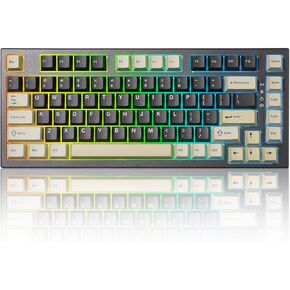 YUNZII RT80 Rapid Trigger Hall Effect Magnetic Gaming Keyboard,8K Polling Rate,75% Layout,BT/2.4GHz/Wired,RGB Backlit,Gasket Hot Swap,Adjustable Actuation for Win/Mac (White Line, Gateron White)
KWD 33
YUNZII RT80 Rapid Trigger Hall Effect Magnetic Gaming Keyboard,8K Polling Rate,75% Layout,BT/2.4GHz/Wired,RGB Backlit,Gasket Hot Swap,Adjustable Actuation for Win/Mac (White Line, Gateron White)
KWD 33
 Tsungup Custom Keycaps,131 Keys PBT Starry Sky Side Printed Keycaps,Cherry Profile Key Caps Keyboard Keycap Set for Cherry MX Switches Mechanical Keyboard(Black)
KWD 12
Tsungup Custom Keycaps,131 Keys PBT Starry Sky Side Printed Keycaps,Cherry Profile Key Caps Keyboard Keycap Set for Cherry MX Switches Mechanical Keyboard(Black)
KWD 12




