【Easy to use】Just single press the button switch on the stylus, the power digital starts to display, and you can easily start using it without connecting Bluetooth and any apps. Long press the button to turn off the power. The power digital display will enter the standby state after one minute, click the switch to check the remaining power. If the iPad pen does not work, disconnect the Bluetooth connection between iPad and Apple Pencil: Settings > Bluetooth > Apple Pencil > Tap "i" > Forget this device, or turn off Bluetooth: Settings > Bluetooth > Turn off Bluetooth.
【Dual-Tip Stylus】The new dual-tip iPad pencil combines an iPad-specific fine tip with a universal rubber tip that can be used on all touchscreens. The iPad-specific nib is only work for iPad released in 2018 and later. Here are all the compatible models: iPad Pro 12.9 inch (3/4/5/6), iPad Pro 11 inch (all generations), iPad Air 5/4/3, iPad Mini 6/5, iPad 10/9/8/7/6. Be sure to confirm your iPad model before placing your order. While the rubber head can be operated on any touchscreen, it's a perfect backup when your stylus runs out of battery or you're using a non-iPad touch device.
【Long Use Time】Fast charging, using our complimentary charging cable, no fast charging adapter required. Charging time of 15-20 minutes, can provide continuous 10 hours of use time. Five minutes of inactivity automatically shut down, to ensure a long battery life. Packaging includes additional 3 free pen tips to extend the service time, make sure you always have a backup pen tips without fear of can't use the stylus.
【Palm Rejection & Tilt Sensitivity】The 1.5mm tip handles detail like a real pen, without delay or interruption. The stylus has a palm rejection function, which ensures that your hand can be placed on the screen without causing mis-touch. Tilt-sensing technology can draw lines of different thicknesses on the screen depending on the Angle of the iPad pencil. In addition, the magnetic feature makes the iPad pencil firmly attached to the iPad, preventing the stylus from slipping or losing, and easy to carry.
【What You Get】The package includes: stylus*1, replacement nibs*3, Type-C cable*1, and user manual*1. If you have any questions about your order, please contact us at (your account - your order) and we will get back to you within 24 hours to provide you with a pleasant shopping experience.


 Stylus for Apple iPad Pencil 6th/7th/8th/9th/10th, iPad Air 3th/4th/5th, iPad Mini 5th/6th, iPad Pro 11/12.9 inch, Pen with Palm Rejection & Tilt Sensitivity, Magnetic and USB-C Charging
KWD 6.500
Stylus for Apple iPad Pencil 6th/7th/8th/9th/10th, iPad Air 3th/4th/5th, iPad Mini 5th/6th, iPad Pro 11/12.9 inch, Pen with Palm Rejection & Tilt Sensitivity, Magnetic and USB-C Charging
KWD 6.500
 Stylus Pen for iPad 2018- Later, Hidden Charging Port Alternative to Apple Pencil USB-C, Compatible with iPad Mini 5/6,iPad Air 3/4/5, iPad 6/7/8/9/10, iPad Pro 11"/12.9", Fast Charge iPad Pencil
KWD 6.500
Stylus Pen for iPad 2018- Later, Hidden Charging Port Alternative to Apple Pencil USB-C, Compatible with iPad Mini 5/6,iPad Air 3/4/5, iPad 6/7/8/9/10, iPad Pro 11"/12.9", Fast Charge iPad Pencil
KWD 6.500
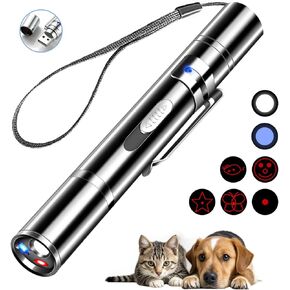 Laser Pointer Cat Toys, Cat Laser Pointer Toy with Three Light Modes, Five Adjustable Patterns,USB Portable Charging, Interactive cat Toy Multifunctional and Portable
KWD 2.500
Laser Pointer Cat Toys, Cat Laser Pointer Toy with Three Light Modes, Five Adjustable Patterns,USB Portable Charging, Interactive cat Toy Multifunctional and Portable
KWD 2.500
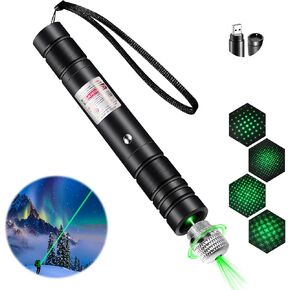 Laser Pointer High Power, Green Laser Pointer Indicator Light, Long Range Lazer Pointer for Hiking, USB Charge
KWD 4.500
Laser Pointer High Power, Green Laser Pointer Indicator Light, Long Range Lazer Pointer for Hiking, USB Charge
KWD 4.500




