- Shopping, made easy.
- /
- Get the app!
How to Use:
Product Installation
1. Turn off the power and unplug all connectors, disassemble the main chassis
2. If there are other graphics cards installed on the motherboard, please unplug them first and then insert the new graphics card into the PCI Express X16 slot provided by the motherboard.
3. If the graphics card comes with an additional power input connector, please find the corresponding plug on the host power supply and insert the graphics card, please use these adapter plugs and connect the graphics card in order to provide sufficient power to the graphics card
4. Tighten the fixing screws on the graphics card bezel to confirm that the graphics card is fixed properly
5. Cover back the case, reconnect all peripheral connectors, and then insert the monitor connector into the corresponding interface on the graphics card
6. If you need to use TV OUT, HD Multimedia Interface, DisplayPort and other interfaces of your TV or display device, please confirm whether the graphics card has the corresponding interface first, and if so, connect the display device and the graphics card directly with the corresponding cable.
Specification:
Item Type: 1050 Ti Graphics Card
Material: PCB
Model: For GTX1050TI 4GB
Core Designation and Process: GP107, 14nm
Unity Shaders: 768
Core Frequency, Memory Frequency: 1304MHz, 7008MHz
Memory Capacity and Specifications: 4G, 128bit, GDDR5
Output Interface: DVI, DP, HD Multimedia Interface
Bus Interface: PCI Express 3.0x16
Cooling Fan: Yes
Package List:
1 x Graphics Card
1 x Power Line
1 x User Manual
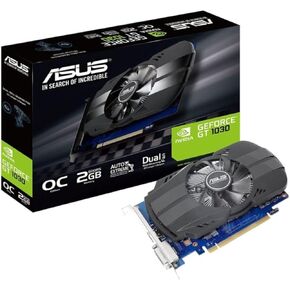 Asus GF PH-GT1030-O2G PCIE3, 90YV0AU0-M0NA00
KWD 61.500
Asus GF PH-GT1030-O2G PCIE3, 90YV0AU0-M0NA00
KWD 61.500
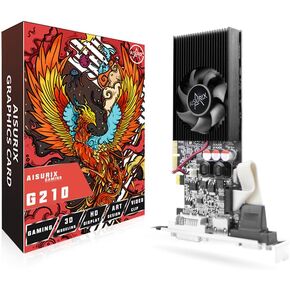 GT 210 1G Graphics Card, 64Bit 589MHZ 1024 MB DDR3 PCI Express 2.0 Graphics Card, DVI VGA HDMI Low Profile Graphics Card with Cooling Fan
KWD 14.500
GT 210 1G Graphics Card, 64Bit 589MHZ 1024 MB DDR3 PCI Express 2.0 Graphics Card, DVI VGA HDMI Low Profile Graphics Card with Cooling Fan
KWD 14.500
 -38%
ZOTAC Gaming GeForce RTX 3070 Twin Edge OC 8GB GDDR6 256-bit 14 Gbps PCIE 4.0 Gaming Graphics Card, IceStorm 2.0 Advanced Cooling, White LED Logo Lighting, ZT-A30700H-10P (Renewed)
KWD 94
-38%
ZOTAC Gaming GeForce RTX 3070 Twin Edge OC 8GB GDDR6 256-bit 14 Gbps PCIE 4.0 Gaming Graphics Card, IceStorm 2.0 Advanced Cooling, White LED Logo Lighting, ZT-A30700H-10P (Renewed)
KWD 94
 -60%
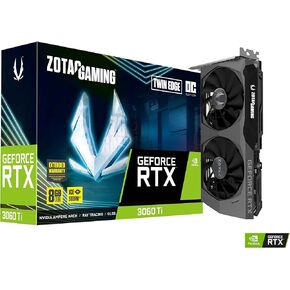
ZOTAC Gaming GeForce RTX 3060 Ti Twin Edge OC 8GB GDDR6 256-bit 14 Gbps PCIE 4.0 Gaming Graphics Card, IceStorm 2.0 Advanced Cooling, Active Fan Control, Freeze Fan Stop ZT-A30610H-10M (Renewed)
KWD 97.500
-60%
ZOTAC Gaming GeForce RTX 3060 Ti Twin Edge OC 8GB GDDR6 256-bit 14 Gbps PCIE 4.0 Gaming Graphics Card, IceStorm 2.0 Advanced Cooling, Active Fan Control, Freeze Fan Stop ZT-A30610H-10M (Renewed)
KWD 97.500




