- Shopping, made easy.
- /
- Get the app!
PC Webcam with Built-In Microphone
Add true-to-life video calling to your PC experience with the affordable Logitech QuickCam Communicate MP. With the true 1.3-megapixel sensor, RightLight Technology, and RightSound Technology, video calls look and sound so real, it's like being in the same room with far-away family and friends. And with bonus Logitech Vid video-calling software, being there is finally fast, free and easy.
Be there for the moments that matter in true-to-life video calling clarity.
Your life is crazy busy. You'd love to see far-flung family and friends more often. Yet, there's never enough vacation time or money to go around. Problem solved. With QuickCam Communicate MP and free Logitech Vid video-calling software, it's fast, free and easy to "be there" in person. The video and sound experience is so true-to-life, it's like being in the same room with the people you care about most. In just one click, you can be there for your grandchild's birthday, the graduate's big day or to open holiday presents together, from across the country or the world. Thanks to Logitech, high quality video calling is dramatically simplified. So now, there's nothing to keep you from sharing the moments that matter.
Introducing Vid, Logitech's fast, free and easy new video calling software.
Logitech video calling software lets you install and call in half the time.
It's about time video calling became easy for anyone to use. With new Logitech Vid software and the QuickCam Communicate MP, you get a sharp and clear, yet dramatically simplified, video calling experience. It's the "one-click-to-call" software solution that works seamlessly with any new or existing Logitech webcam. And it's free for you and anyone you call.
* Click the download button for your operating system, select "Save" and install file to a location you can remember. When download is complete, click on file to begin installing new software. If you have installed a previous version of Vid (i.e. the version that came on CD with your new camera) we recommend you completely uninstall it before installing this new version. This release of Vid software only supports the platforms shown above.
Easy set up
Logitech video calling software lets you
install and call in half the time.
Just download the free software and you'll be ready to call in half the time it takes using other video call services. With the simple, intuitive interface, you can set up Vid--and your Logitech webcam--in just a few clicks. Click. Chat. Simple as that.
Fast connections
One-click calling without extra steps and hassles.Finally, video calling a friend is as easy as clicking on their picture and email address. No screen names or accounts to remember. With Vid "one-click-to-call", there are no extra steps to keep you from connecting with the people you care about most. All of your contacts are within easy reach. So you're ready to call the moment your webcam is.
Free for all
Invite and add friends using their email address. It's free and that simple. Vid software is free with your new or existing Logitech webcam. It's also free for anyone you invite to connect with you. Want to add a friend to your call list? Simply choose "Add a friend" to send them an email invitation and software link. Once they sign up, you're both set for free one-click calling--no strings attached.
Clear video chats
Crisp, clear, full-screen viewing powered by the Logitech SightSpeed network.All of this simplicity is powered by the Logitech SightSpeed network, a groundbreaking framework designed specifically for video calling. It's also how Logitech Vid can deliver crisp, clear video and audio without complications. See it for yourself with Logitech Vid and QuickCam Communicate MP.
Key FeaturesTrue 1.3-megapixel sensor for exceptional video and photo resolution
When it comes to seeing important details like the smile in your eyes, resolution means everything. Here's where QuickCam Communicate MP really shines--especially for its modest price. The high-resolution 1.3-megapixel sensor captures your video image in remarkably crisp detail. The same goes for photos, software-enhanced to rich, colorful 4-megapixel resolution.
Up to 30 frames per second for a smooth, natural video-calling experience
Enjoy a premium video calling experience on Logitech Vid or Skype. With either free service, you can stream your video calls at up to 30 frames per second for an even smoother, more detailed picture than standard video.
RightLight Technology puts you in the perfect light
Dim light RightLightMaking a late-night video call from a dimly lit room? The webcam's integrated RightLight technology automatically corrects for poor lighting, so the person you're calling sees you perfectly. No shadows covering your face. No need to adjust the lights. The webcam does all the work, so you can just relax and enjoy the conversation.
RightSound Technology and built-in microphone for clear chats
Trying to carry on a video conversation while your dog is barking outside the door? Chat away. The integrated microphone with RightSound Technology automatically cancels distracting background noises and "voice, voice, voice" echoes. So, your every word is clearly heard. And if you want your video call to be more private, just add a headset.
Logitech Fun Filters let you make the artistic call
Fun Filters bring out your creative styleAdd a fun, artistic twist to your video calls with a wide selection of special effects. Go retro with the look of a '50s movie reel. Rock on in music video style. Or transform your image into a work of neon art. Apply them easily to make your streaming video calls as entertaining as you.
Works with all instant messaging programs for hassle-free calling
All you need for video calling is the webcam, a high-speed Internet connection and any instant messaging software. We recommend Logitech Vid video calling software. You can also download other IM programs online. Unlike some brands, QuickCam Communicate MP works with all instant messaging programs--yours and whomever you call, so getting connected is hassle-free.
Use QuickCam Communicate MP and free video-calling applications to be there "in person" across town or across the world.
Which Webcam Is Right For You? Good Better Best Video Quality Photo Quality Optics Corrects for Poor Lighting Autofocus Built-in Mic Interactive Video Effects For Home or Office
2.0 MP HD 1600 x 1200 pixels
8.0 MP Carl Zeiss with motorized tracking
with echo and noise reduction
2.0 MP 1600 x 1200 pixels
8.0 MP Carl Zeiss ultra-wide angle
with echo and noise reduction
2.0 MP 1600 x 1200 pixels
8.0 MP Carl Zeiss ultra-wide angle
1.3 MP HD 960 x 720 pixels
5.0 MP Glass ultra-wide angle
with echo and noise reduction
1.3 MP HD 960 x 720 pixels
4.0 MP Plastic
with echo and noise reduction
640 x 480 pixels
640 x 480 pixels
with echo and noise reduction For Travel or Mobile
2.0 MP HD 1600 x 1200 pixels
8.0 MP Carl Zeiss ultra-wide angle
with echo and noise reduction
640 x 480 pixels
1.3 MP Glass
with echo and noise reduction
640 x 480 pixels
640 x 480 pixels Plastic
with echo and noise reduction
Browse for more Logitech products Enhance your video calling experience with great Logitech accessories.
What's In The Box ?Package ContentsLogitech QuickCam Communicate MP webcam
Universal clip that fits any monitors and notebooks
USB cable (6 feet)
Logitech QuickCam software CD
Quick-start guide
2-year limited warranty
Logitech Vid software available via free download at logitech.com
 Amcrest 1080P Webcam with Microphone for Desktop, Web Cam Computer Camera, Streaming HD USB Web Camera for Laptop & PC with Privacy Cover, Wide Angle Lens, Superior Low Light (AWC195-B)
KWD 10.500
Amcrest 1080P Webcam with Microphone for Desktop, Web Cam Computer Camera, Streaming HD USB Web Camera for Laptop & PC with Privacy Cover, Wide Angle Lens, Superior Low Light (AWC195-B)
KWD 10.500
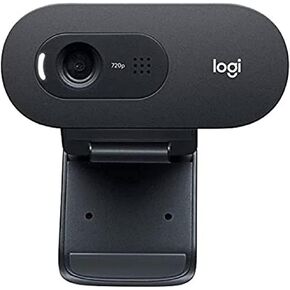 Logitech C505e Webcam 1280 x 720 Pixels USB Black C505e, 1280, W125909773 (Pixels USB Black C505e, 1280 x 720 Pixels, 30 fps, 1280x720@30fps, 720p, 60ø, USB)
KWD 10.500
Logitech C505e Webcam 1280 x 720 Pixels USB Black C505e, 1280, W125909773 (Pixels USB Black C505e, 1280 x 720 Pixels, 30 fps, 1280x720@30fps, 720p, 60ø, USB)
KWD 10.500
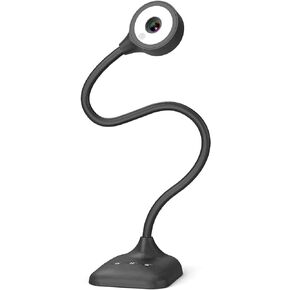 PAKOTOO USB Document Camera for Teachers, Webcam/Doc Camera for Classroom with A3 Format, 3-Level LED Lights, Image Invert, Fold, Dual mic for Mac OS, Windows, Zoom, OBS Work with Distance Learning
KWD 20.500
PAKOTOO USB Document Camera for Teachers, Webcam/Doc Camera for Classroom with A3 Format, 3-Level LED Lights, Image Invert, Fold, Dual mic for Mac OS, Windows, Zoom, OBS Work with Distance Learning
KWD 20.500
 OKIOLABS OKIOCAM T USB Document Camera 11" x 17" for Teachers and Classroom, Work from Home, Online Teaching, Video Calling, Doc Camera for Mac PC Chromebook, Stop Motion Time Lapse, QHD 1944p
KWD 36.500
OKIOLABS OKIOCAM T USB Document Camera 11" x 17" for Teachers and Classroom, Work from Home, Online Teaching, Video Calling, Doc Camera for Mac PC Chromebook, Stop Motion Time Lapse, QHD 1944p
KWD 36.500



