LAMA for Samsung Galaxy Tab 8.7-inch A11/A9 Backlit Keyboard Case, Detachable Wireless Keyboard Case for Galaxy Tab A9-2023/ A11-2025, Lightweight Stand Cover with Built-in S Pen Holder, Black
Backlit Keyboard Case Only Compatibility with Samsung Galaxy Tab A9-2023 (SM-X110/SM-X115) /Tab A11-2025 (SM-X133/SM-X135). ***Please Click your tablet "Settings-System-About Tablet Model--SM-XXXX") confirm model number before ordering. Not fit for 11 inch A9+/A11+!
Maganetically Wireless Keyboard: This case with keyboard used for 8.7 inch Samsung Galaxy A11 or A9 Tablet, using a flip magnet separate design; Detachable Bluetooth keyboard with a magnetic hybrid case that transforms your tablet into a highly performant and easy-to-use laptop.
Full Protective Case with S Pen Holder: The premium composition leather exterior and soft, non-slip interior protect your tablet from accidental drops and scratches. The built-in Pencil holder allows you to take your Pencil wherever you want. (🌈NOTE: S Pen is not included.). Precise cutouts allow full access to all features (Such as buttons, speakers, cameras).
Auto Sleep/Wake with Long Battery Life: Built-in premium lithium-ion battery with power saving mode, providing a continuous working time of at least 100 hours and 100 days standby time on a full charge. (NOTE: Please charge the keyboard for about 2-3 hours before first use). Automatically sleep or wake when the case is closed or opened, which preserves battery life, reducing energy consumption and extending device longevity.
Connect Keyboard/Mouse to Tablet: 1. Keyboard: Power "ON" keyboard and open Bluetooth in tablet settings, long press the "Connect"button (indicator will keep twinkle)on the keyboard, search for "Bluetooth Keyboard" on tablet's Bluetooth interface,then click "Connect". 2. Mouse: Switch mouse to "Bluetooth" symbol,and seacrch the "BT5.2 Mouse" on tablet, finished connected. This mouse also can used with computer or laptop, switch the power button to"2.4G" and plug the USB receiver in deivice.


 LAMA 7 Colors Backlit Magnetic Keyboard Case for iPad Air 13 inch M3 2025/ M2 2024, Keyboard Case for iPad Pro 12.9"(6th/5th/4th/3rd Gen), Multi-Touch Trackpad, Floating Stand, Digital Display, Black
KWD 33
LAMA 7 Colors Backlit Magnetic Keyboard Case for iPad Air 13 inch M3 2025/ M2 2024, Keyboard Case for iPad Pro 12.9"(6th/5th/4th/3rd Gen), Multi-Touch Trackpad, Floating Stand, Digital Display, Black
KWD 33
 -12%
LAMA Keyboard Case with Mouse for Samsung Galaxy Tab S11 11-inch 2025, 7-Color Backlit Keyboard with Case, Detachable Wireless Keyboard Cover for Galaxy S11 11" Keyboard, Black
KWD 11.500
-12%
LAMA Keyboard Case with Mouse for Samsung Galaxy Tab S11 11-inch 2025, 7-Color Backlit Keyboard with Case, Detachable Wireless Keyboard Cover for Galaxy S11 11" Keyboard, Black
KWD 11.500
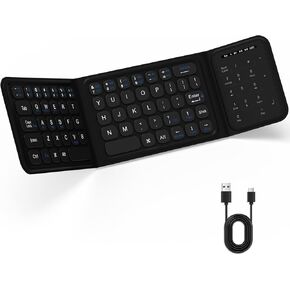 LAMA Foldable Bluetooth Keyboard with Trackpad, Wireless Portable Ultra-Slim Foldable Keyboard for iPad Tablet Smartphone iOS Android Windows PC, Grey
KWD 11.500
LAMA Foldable Bluetooth Keyboard with Trackpad, Wireless Portable Ultra-Slim Foldable Keyboard for iPad Tablet Smartphone iOS Android Windows PC, Grey
KWD 11.500
 -9%
Trackpad Keyboard Case for iPad (A16) 11th 2025 /10th Gen 2022, Ultra-Light Magnetic Rotatable & Detachable, 7-Colors Backlit Keyboard Case for iPad 11th 11 inch /10th 10.9 inch,Portrait/Landscape
KWD 15
-9%
Trackpad Keyboard Case for iPad (A16) 11th 2025 /10th Gen 2022, Ultra-Light Magnetic Rotatable & Detachable, 7-Colors Backlit Keyboard Case for iPad 11th 11 inch /10th 10.9 inch,Portrait/Landscape
KWD 15

