- Shopping, made easy.
- /
- Get the app!
Nanhent 2024 Introduces this stunningly attractive and unique case.
7 Colors Rainbow Backlights Touchpad Keyboard Case for Surface Go 4 /Surface Go 3 / Surface Go 2 / Surface Go Tablet.
How to connect the keyboard with the tablet?
1. Dial ON/OFF button on right direction for opening keyboard, press "FN+C" for 2 seconds into wireless matching condition.(The Bluetooth light blinks slowly)
2. Open Bluetooth on device, search keyboard name: [Keyboard] for matching device to keyboard.
3. Click the "Keyboard" to connect, finish.
How to adjusts the colour of the backlight?
1.Click "Bulb" Key to toggle between breathing light and fixed light modes.
2.Fixed light modes, click "RGB key" to switch between 7 color schemes.
Specification:
Charging voltage: 5V
Bluetooth version: Bluetooth 3.0
Transmission distance: up to 10 m
Capacity of battery: 450 mAH
Charging time: 2-3 hours
Working time: 90 hours without backlight
Working time: 10 hours with backlight
Standby time: 180 days
What's in the box?
Tablet Case * 1
Rainbow Backlight Touchpad Keyboard * 1
USB-C Charging Cable * 1
Product Manual * 1
 -7%
Keyboard Case for Xiaomi Pad 6 / Pad 6 Pro 11 Inch 2023 Tablet, Slim PU Stand Cover with Magnetically Detachable Wireless Bluetooth Keyboard (Xiaomi Pad 6/6 Pro 11)
KWD 13.500
-7%
Keyboard Case for Xiaomi Pad 6 / Pad 6 Pro 11 Inch 2023 Tablet, Slim PU Stand Cover with Magnetically Detachable Wireless Bluetooth Keyboard (Xiaomi Pad 6/6 Pro 11)
KWD 13.500
 Keyboard Case with Screen Protector for iPad 10.2" 9th Generation / 8th Gen / 7th Gen, Built-in Pencil Holder Magnetic Detachable Wireless Keyboard Cover with Tempered Glass (Black)
KWD 11.500
Keyboard Case with Screen Protector for iPad 10.2" 9th Generation / 8th Gen / 7th Gen, Built-in Pencil Holder Magnetic Detachable Wireless Keyboard Cover with Tempered Glass (Black)
KWD 11.500
 Keyboard Case for Lenovo Tab M8 2023 Release 8" Tablet (TB-300FU/TB-300XU), Slim PU Stand Cover with Magnetically Detachable Wireless Bluetooth Keyboard (Tab M8 4th Gen 8")
KWD 12.500
Keyboard Case for Lenovo Tab M8 2023 Release 8" Tablet (TB-300FU/TB-300XU), Slim PU Stand Cover with Magnetically Detachable Wireless Bluetooth Keyboard (Tab M8 4th Gen 8")
KWD 12.500
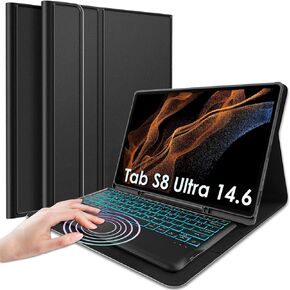 Nanhent Backlit Touchpad Keyboard Case for Samsung Galaxy Tab S8 Ultra 2022 14.6 Inch Tablet, 7 Colors Backlight Detachable Wireless Trackpad Keyboard & Slim PU Stand Cover with S Pen Holder
KWD 16.500
Nanhent Backlit Touchpad Keyboard Case for Samsung Galaxy Tab S8 Ultra 2022 14.6 Inch Tablet, 7 Colors Backlight Detachable Wireless Trackpad Keyboard & Slim PU Stand Cover with S Pen Holder
KWD 16.500




