Switch 2 Dock,Switch 2 Portable TV Dock Station with 100W PD Charger Port +4K60Hz HDMI+ USB 3.0 Port for Nintendo Switch 2/Switch/Steam Deck/Rog Ally/MacBook/Ipad and More (Switch 2 Dock-Blue)
All electronics ship with US style plugs.You may need a voltage converter or a plug adapter.
Special Features
🔥🔥🔥【Wide Compatibility】-- The switch 2 dock Supports high-spec video output, delivering up to 4K@60Hz and 1080p@120Hz for Switch devices in certain scenarios for clear visuals. Compatible not only with Switch 1 and Switch 2, but also with smartphones, iPads, laptops, Steam Deck, ROG Ally, and more. Can replace multiple types of original docks and cables, meeting multi-device screen-casting needs.
🔥🔥🔥【Flexible and Portable】-- This switch 2 dock station Compact and lightweight, easy to carry—fits effortlessly into a jacket pocket, backpack, or handbag without taking up much space. Ideal for travel, visiting friends, family gatherings, and other on-the-go scenarios. Functions are on par with the official dock, making it an ideal alternative for the Nintendo Switch 2 official dock.
🔥🔥🔥【Cost-Effective】-- No need to rely on the original charger; third-party chargers work perfectly. High cable compatibility allows the use of the Switch 2 original cable or any additional USB-C charging cable, eliminating the need for extra power accessories and reducing overall usage costs.
🔥🔥🔥【Plug & Play】-- Switch 2 travel dock/switch 2 portable dock No drivers or firmware needed. Just connect HDMI and USB-C power to start screen-casting instantly. Some models support TV/display mode switching while charging, keeping Switch 2 naturally cooled for long, smooth gaming sessions.
🔥🔥🔥【Easy Setup】-- 1️⃣ Use a 15V 2.6A PD wall charger. 2️⃣ Connect the HDMI cable to the adapter. 3️⃣ Switch your device to the corresponding HDMI input. 4️⃣ Wake up Switch 2 and connect the adapter's USB-C output. 5️⃣ Wait a few seconds—your screen lights up automatically.
🔥🔥🔥【BE ATTENTION】--Due to the nintendo switch 2 system upgrade,so the switch 2 dock should be upgrade before use,when you place the order you can download the ungrade file on the fifth picture, you also can contact the customer service to send the upgrade file to you.

 -9%
VGBUS Switch Game Case Compatible with Nintendo Switch/Oled/Lite.Switch Game Case Holder for Nintendo Switch Game Card with 24 Game Card Storage. (Animal Crossing)
KWD 5
-9%
VGBUS Switch Game Case Compatible with Nintendo Switch/Oled/Lite.Switch Game Case Holder for Nintendo Switch Game Card with 24 Game Card Storage. (Animal Crossing)
KWD 5
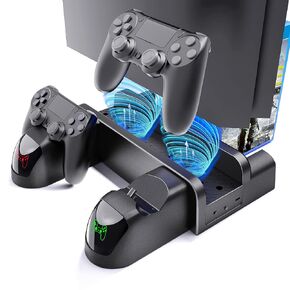 VGBUS PS4 Stand Cooling Fan Station for Playstation 4/PS4 Slim/PS4 Pro, PS4 Vertical Charging Station with Dual Controller,PS4 Stand with USB Port & 12 Games Slots.
KWD 9
VGBUS PS4 Stand Cooling Fan Station for Playstation 4/PS4 Slim/PS4 Pro, PS4 Vertical Charging Station with Dual Controller,PS4 Stand with USB Port & 12 Games Slots.
KWD 9
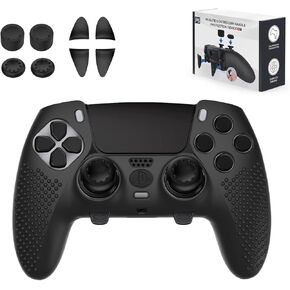 PS5 Edge Controller Cover, Protective Case for Playstation 5 Edge Controller, PS5 Controller Skin for Playstation 5 DualSense Wireless Edge Controller with 4PCS Thumb Grip Caps+L2 R2 Trigger Extender
KWD 7
PS5 Edge Controller Cover, Protective Case for Playstation 5 Edge Controller, PS5 Controller Skin for Playstation 5 DualSense Wireless Edge Controller with 4PCS Thumb Grip Caps+L2 R2 Trigger Extender
KWD 7
 14 in 1 Metal Thumbsticks for Xbox One Elite Series 2, Elite Series 2 Controller Accessory Parts, Gaming Accessory Replacement, Metal Mod 6 Swap Joystick, 4 Paddles, 2 D-Pads, 1 Tool (Black)
KWD 8
14 in 1 Metal Thumbsticks for Xbox One Elite Series 2, Elite Series 2 Controller Accessory Parts, Gaming Accessory Replacement, Metal Mod 6 Swap Joystick, 4 Paddles, 2 D-Pads, 1 Tool (Black)
KWD 8




