KVM Switch 2 Monitor 2 Computers:This HDMI KVM Switch with 2 HDMI ports allows control of 2 Computers, enabling them to share a single monitor along with keyboard and mouse.any desktop pc with hdmi output like laptop,gaming console,office pc,network server computer,mini pc can share same keybord monitor mouse,cut costs and keep desktop room tidy.Fast switching between 2 computers (2-5 seconds depending on resolution)
USB Switch - Share 4 USB3.0 devices,support usb wireless keyboard mouse,printer,scanner,U disk, portable SSD drive, flash drive.plug & play,drive-free,compatible all os ,windows, dos, mac os, android,kinds of linux.Notice: Only the use of the computer USB3.0 port output can ensure the 3 USB ports of the KVM OUT port is the rate of USB3.0
8K HDMI 2.1 - HDMI 2.1 has 48Gbps ultra-high speed bandwidth, much faster than hdmi 2.0(18Gbps) and hdmi 1.4(10.2Gbps). This 8K KVM switch 2 monitors 2 computers Supports Full Ultra HD 8K(4320p)@60Hz and is backward compatible with 4K(2160p)@60Hz/120Hz/144Hz, 2K(10 80p)@120Hz/165Hz/240Hz etc. HDCP 2.2 and 2.3, HDR 10, ARC and eARC, VRR , QMS, QFT, DTS, Dolby Atmos, Dolby TrueHD 7.1 Audio, 3D.
2 ways to switch - desktop controller and faceplate button. you can use the controller or push the button to swaping the pc. the Led lights indicate working computer. usb powered no addtional dc adpter
What You Get: 1* KAGO 8K HDMI KVM Switch, 2* USB A Cables, 1* Desktop Controller, 1* User Guide. NOTE: 1. This KVM switch is not compatible with those host devices that have only USB C ports and do not have any USB A ports. 2. Not supported for use with docking station. 3. If you connect a wireless keyboard and mouse, please ensure that its working range meets the product requirements (within 1m/3.3ft for a single USB device, and within 0.3m/0.98ft for multiple USB devices).
Resolution Notes - KVM switch HDMI does support 8K, 4K and other resolutions, KVM is just a pass-through switch, so if we want to use 8K resolution, the computer, monitor and HDMI cables need to support 8K at the same time. it is recommended to use an 8K HDMI 2.1 cable.
After connecting the KVM keyboard and mouse, it is best to refresh the keyboard and mouse drivers for each PC to ensure that the keyboard and mouse of a single computer work normally after connecting to KVM. This way, the keyboard and mouse can be used correctly when switching between two computers. Please contact technical support through Amazon to answer any questions during use.
Note: 1. EDID emulation is not supported. 2. Please make sure that each of your computers supports dual-screen simultaneous display. 3. Please make sure that your computer has 2 HDMI interfaces + 1 USB-A interface. 4. Each computer must be connected to 2 HDMI cables + 1 USB-A cable to work properly. 5. The two monitors can only output the video source of one computer, and cannot output the signal source of PC1 and PC2 at the same time. 6. To ensure normal use, please be sure to connect the power supply through the power adapter.


 -4%
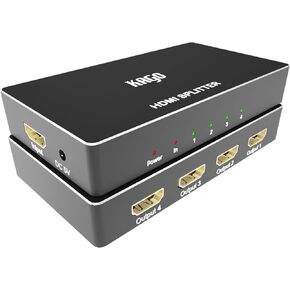
HDMI Splitter 1 in 4 Out - 4 Way Premium Quality Outputs,Duplicator/Distributor High Resolutions Support HDMI 2.0, HDCP 2.2, 18 Gbps 4K@60Hz 2k@120Hz 36-Bit Deep Color UltraHD,Plug&Play
KWD 12.500
-4%
HDMI Splitter 1 in 4 Out - 4 Way Premium Quality Outputs,Duplicator/Distributor High Resolutions Support HDMI 2.0, HDCP 2.2, 18 Gbps 4K@60Hz 2k@120Hz 36-Bit Deep Color UltraHD,Plug&Play
KWD 12.500
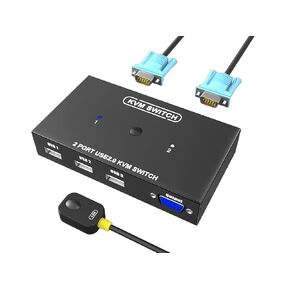 KVM Switch VGA 4 Port - VGA KVM Switch for 4 Computers Share 1 Monitor & 3 USB 2.0 Devices,Keyboard Mouse Scanner Printer,U Disk, Driver-Free for All OS,4 KVM Cables 1 Desktop Controller Included
KWD 7
KVM Switch VGA 4 Port - VGA KVM Switch for 4 Computers Share 1 Monitor & 3 USB 2.0 Devices,Keyboard Mouse Scanner Printer,U Disk, Driver-Free for All OS,4 KVM Cables 1 Desktop Controller Included
KWD 7
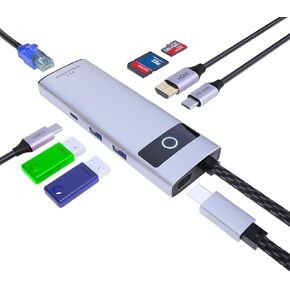 KAGO 8 in 1 USB C Docking Station Hub,USB-A 2.0/3.0,USB Type-C Data Ports,4K@30Hz HDMI,100W Power Delivery,SD/TF Card Reader,100M RJ45 for MacBook Pro/Air,iPad Pro,iPhone 15/Pro/Pro Max
KWD 6.500
KAGO 8 in 1 USB C Docking Station Hub,USB-A 2.0/3.0,USB Type-C Data Ports,4K@30Hz HDMI,100W Power Delivery,SD/TF Card Reader,100M RJ45 for MacBook Pro/Air,iPad Pro,iPhone 15/Pro/Pro Max
KWD 6.500
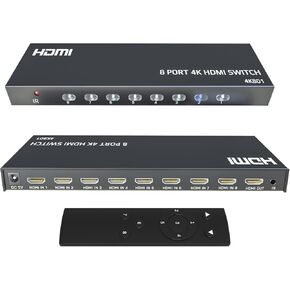 KAGO HDMI Switch - 8 Port HDMI Switch,HDMI Switcher 8 in 1 Out,4K HDMI Selector Box with Remote, Support 4K30Hz 2160p 1080p,HDR 3D,Compatible with PS3/4 Xbox PC Laptop Projector Blu-ray Player
KWD 8.500
KAGO HDMI Switch - 8 Port HDMI Switch,HDMI Switcher 8 in 1 Out,4K HDMI Selector Box with Remote, Support 4K30Hz 2160p 1080p,HDR 3D,Compatible with PS3/4 Xbox PC Laptop Projector Blu-ray Player
KWD 8.500

