- Shopping, made easy.
- /
- Get the app!

SENGBIRCH for Samsung Galaxy Tab A11+ Plus 2025 & A9+ Plus 11 Inch 2023 (SM-X210/X216/X218) Case with Backlit Keyboard - Precise Trackpad / 7 Colors Backlit / Wireless Detachable Keyboard / Soft PU Cover / Rechargeable Battery / Easy Take Pen Holder / Adjustable View Angles / Shortcuts Keys
Exclusively designed for Samsung Galaxy Tab A11+ Plus 11"" 2025 (SM-X310 /SM-X315/SM-X236 ) & A9+ Plus 11"" 2023 (SM-X210/SM-X216/SM-X218) . Not fit any other models. Please confirm your tablet model before purchasing.
【Keyboard Functionally】Magnetically detachable super slim 5mm and light weight bluetooth keyboard with 10M range. And the keypad case for samsung a11 plus with strong magnetic keyboard gives you a stable platform for typing that won't move easily.
【Rechargeable Battery】Built-in rechargeable battery for long keyboard life. For galaxy tablet 11inch a9+ case with keyboard ensures your device is always ready for action, thanks to its auto wake/sleep function.
【Precise Cutouts】Precise cutout allows full access to all ports, user interface, sensors, speakers, microphone and cameras.
【Multiple Viewing Angles】This magic keyboard for samsung a9 plus tab has 3 grooves to adjust the viewing angle as you like, make your tablet stand steadily. Perfect for working, writing, reading or watching videos.
【360 Protection for Tablet】For samsung galaxy a9+ 5g case keyboard features a sturdy high-quality PU shell and soft anti slip rubber lining inside, providing comprehensive protection for your tablet.
【Portable Shortcut Keys】The smart cover for galaxy tab a9+ 11inch with backlit keyboard has shortcut function keys, allowing you to enjoy the excellent versatility for samsung galaxy tablet case for typing, reading and gaming.
【Gift Choice】If you are at a loss for gifts ahead of Christmas, Thanksgiving, Mother's Day, Father's Day, or birthday, then a tablet case with magnetic keyboard is a thoughtful gift for parents/children/friends/colleagues!
How to connect to Bluetooth?
1.Please fully charge the keyboard and turn it on (usually 2-3 hours).
2.Press the keys Fn+C to turn on the Bluetooth of the keyboard.
3.Turn on the Bluetooth of the Tablet.
4.Find and select ''Bluetooth Keyboard'', it will automatically connect.
 -9%
SENGBIRCH Magic Keyboard for iPad Pro 11-4th, 3th, 2nd&1st gen, 360° Swivel Ultra Thin Backlit, Trackpad, iPad Air 5th, 4th Generation Magic-Style Keyboard Case - Floating Stand, 1.54 lbs, Black
KWD 15
-9%
SENGBIRCH Magic Keyboard for iPad Pro 11-4th, 3th, 2nd&1st gen, 360° Swivel Ultra Thin Backlit, Trackpad, iPad Air 5th, 4th Generation Magic-Style Keyboard Case - Floating Stand, 1.54 lbs, Black
KWD 15
 -6%
iPad Pro 12.9 Case with Keyboard-3rd, 4th, 5th, 6th Generation, 7 Pure Colors RGB Backlight, USB-C, Bluetooth, Detachable - Smart Keyboard Folio Case for iPad Pro 12.9-inch with Pencil Holder (Black)
KWD 23
-6%
iPad Pro 12.9 Case with Keyboard-3rd, 4th, 5th, 6th Generation, 7 Pure Colors RGB Backlight, USB-C, Bluetooth, Detachable - Smart Keyboard Folio Case for iPad Pro 12.9-inch with Pencil Holder (Black)
KWD 23
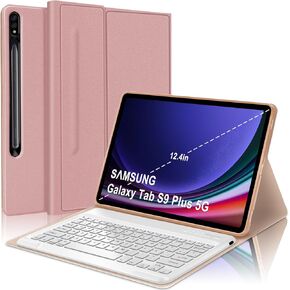 SENGBIRCH Spanish Ñ Keyboard Case for Samsung Galaxy Tab S9+ Plus/S8+/S7 FE/S7+ Plus (12.4-inch), Teclado, Smart Auto Sleep/Wake Up Folio Compatible with S Pen, Bluetooth USB-C Rechargeable, Pink
KWD 6.500
SENGBIRCH Spanish Ñ Keyboard Case for Samsung Galaxy Tab S9+ Plus/S8+/S7 FE/S7+ Plus (12.4-inch), Teclado, Smart Auto Sleep/Wake Up Folio Compatible with S Pen, Bluetooth USB-C Rechargeable, Pink
KWD 6.500
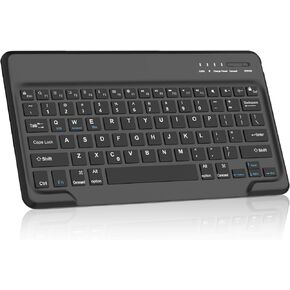 SENGBIRCH Bluetooth Keyboard for iPad Pro (13-inch, 12.9 inch), iPad Air 13-inch, Samsung Galaxy Tablet, Xiaomi, Wireless QWERTY Layout, USB-C Rechargeable 90 Days Battery, US English, Black
KWD 8
SENGBIRCH Bluetooth Keyboard for iPad Pro (13-inch, 12.9 inch), iPad Air 13-inch, Samsung Galaxy Tablet, Xiaomi, Wireless QWERTY Layout, USB-C Rechargeable 90 Days Battery, US English, Black
KWD 8




