Doohoeek Surface Pro 11/10/9/X/8 13 Inch Keyboard, Bluetooth Keyboard with Touch Pad & Lighting Keys Compatible with Surface Pro 13" Copilot+, Pen & Tablets NOT Included
Watch Before Buy: Surface Pro 8 has 12.3-inch version, this keyboard dose NOT fit Surface Pro 8 12.3", ONLY fit surface pro 8 13". The keyboard CAN'T charge pens. This keyboard ONLY works on surface pro 13-inch devices. WRONG models will cause magnet issue. The keyboard is charged via USB-C Cable, NOT supports official smart charge to tablet.
Surface Pro Exclusive Precision: Smart magnetic alignment snaps to 13-inch Pro 11 / Pro 10 / Pro 9 / Pro X /Pro 8 13" edges. No bulky cases or tools needed – just attach and type.
Can't Connect the Bluetooth? Please reset the keyboard and then reconnect the Bluetooth: 1. Turn on the keyboard; 2. Press and hold the first and the last key at the top row of the keyboard until all indicators flash; 3.Press fn and C to enter Bluetooth pairing mode; 4. Search and find "Wireless keyboard".
Stable Bluetooth Connection: Advanced chip and latest Bluetooth 5.3 reduces latency and stays connected even in crowded cafes.
Win 11-Ready Touch Pad: Swipe apps instantly, activate virtual desktop control, all Windows 11 gestures are supported. The trackpad also detects accidental touches - cursor stays solid while typing. Note: You could go settings -touchpad to adjust trackpad sensitivity.
Lighting Keys for Late Night: Choosing from adjustable backlight, this keyboard allows easy input under low-light environments, combining style with practicality.


 -32%
Doohoeek Bluetooth Shortcut Keyboard for Adobe Photoshop for PC Computer, Desktop, iPad & MacBook, PS Shortcut Hotkeys Keypad Rechargeable with 7-Color Backlit Key for MacOS, iOS & Windows
KWD 8.500
-32%
Doohoeek Bluetooth Shortcut Keyboard for Adobe Photoshop for PC Computer, Desktop, iPad & MacBook, PS Shortcut Hotkeys Keypad Rechargeable with 7-Color Backlit Key for MacOS, iOS & Windows
KWD 8.500
 Doohoeek Backlit Page Turner Pedal Wireless for iPads Tablets Phones, Rechargeable Universal Foot Pedal with 7-Color Backlit & Sensitive Pedals for Playing Instruments or Prompting
KWD 11.500
Doohoeek Backlit Page Turner Pedal Wireless for iPads Tablets Phones, Rechargeable Universal Foot Pedal with 7-Color Backlit & Sensitive Pedals for Playing Instruments or Prompting
KWD 11.500
 -22%
Doohoeek Universal Bluetooth Keyboard for Samsung Galaxy Z Fold, iPads, Tablets and Phones, Dual Bluetooth Mini Keyboard with Any-Angle Kickstand & Leather Cover for Android, Windows and iOS
KWD 9
-22%
Doohoeek Universal Bluetooth Keyboard for Samsung Galaxy Z Fold, iPads, Tablets and Phones, Dual Bluetooth Mini Keyboard with Any-Angle Kickstand & Leather Cover for Android, Windows and iOS
KWD 9
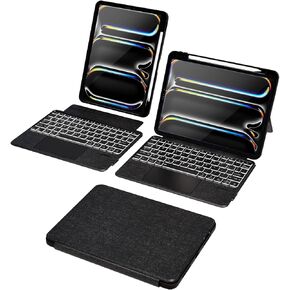 Doohoeek Keyboard Folio Compatible with New iPad Pro 11-inch (M4, 2024), iPad Pro 11 Keyboard Case with Any-Angle Kickstand, Detachable Bluetooth Keyboard with Trackpad & 7-Color Backlit
KWD 8.500
Doohoeek Keyboard Folio Compatible with New iPad Pro 11-inch (M4, 2024), iPad Pro 11 Keyboard Case with Any-Angle Kickstand, Detachable Bluetooth Keyboard with Trackpad & 7-Color Backlit
KWD 8.500




