Automatic Backup Made Effortless: This USB flash drive delivers 1-click automatic backup for photos, videos—no tech skills needed. Its smart duplicate detection skips existing files, so you never waste storage on repeats. Simply plug in the memory stick, launch the "Photo Charger" app, and it instantly backs up : no messy cables, no iCloud subscription fees, no internet required. Keep your data secure offline, whether at home, traveling, or on the go—your memories and files stay protected, effortlessly.
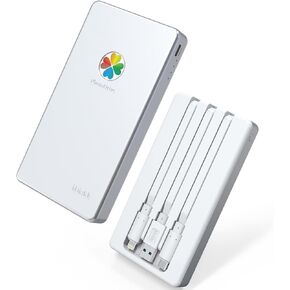
Perfectly compatible with multiple devices:This 4-in-1 USB flash drive has Light-ning, USB-C, Micro USB and USB 3.0 interfaces, seamlessly connects with iPhone17 17 Pro/17 Pro Max/16/16 Pro/Pro Max/Plus/15/14/13, iPads, most Android phones, tablets, PCs and Macs.This memory stick enables hassle - free backup an-d transfer of photos, videos, and files across devices, eliminating interface mismatch concerns for smooth, efficient data handling. Say goodbye to interface conflicts for smooth, efficient data flow.【NOTE:If your phone fails to recognize the USB flash drive, try removing the thick phone case first】
100+ Formats, No Fuss—Store & Find It All: Ditch "format errors" for good: This drive saves standard file types including JPEG, HEIC, PNG, GIF, MOV, MPEG4, RAW, MP4, MKV, PDF, Word, MP3, FLAC, and supports a vast array of 100+ total file types. No conversion needed—handle photos, 4K videos, docs, music, and more seamlessly. It auto-sorts files into neat folders (Photos/Videos/Docs) the second you save, so that vacation clip or work report is always easy to find. Access everything instantly without messy searching, and your files stay safe till you delete them. Store freely, find fast, access anywhere.
100+ Formats, No Fuss—Store & Find It All: Ditch "format errors" for good: This drive handles photos (JPG/HEIC/RAW), 4K videos (MP4/MKV), docs (PDF/Word), and more—100+ types total. Auto-sorts into neat folders (Photos/Videos/Docs) the second you save, so that vacation clip or work report is always easy to find. No conversion needed. Access everything instantly, no messy searching. Your files stay safe till *you* delete them. Store freely, find fast, access anywhere.
More Promise Less Concern: If you encounter any issues with your usb c flash drive, contact us please. Our customer support team is available round-the-clock via email and live chat—ready to troubleshoot, guide setup, or assist with returns in no time. No endless waits, no complicated hoops: we prioritize quick, clear solutions.
Note: This flash drive comes with multi-port compatibility (supports iPhone, iPad, Android devices, etc. via its Lightning/USB-C ports), but only one device can be backed up at a time — finish backing up one device first before switching to another for stable data transfer.


 iDiskk App-le Mfi Certified 1TB External Hard Drive Photo Stick for iPad iPhone 15 Android Photo Backup Storage for iPhone 15/14/13/12/12 Pro Max/12 pro/11 pro/X/XR,Mac/iMac/PC,10000mAh Power Bank
KWD 57.500
iDiskk App-le Mfi Certified 1TB External Hard Drive Photo Stick for iPad iPhone 15 Android Photo Backup Storage for iPhone 15/14/13/12/12 Pro Max/12 pro/11 pro/X/XR,Mac/iMac/PC,10000mAh Power Bank
KWD 57.500
 iDiskk Mfi Certified 2TB External Hard Drive for iPhone & iPad (All Models) Android Mobile,MacBook and Windows PC, Photo Storage Photo Stick Drive to Bacukp Photos/Videos,Files,Photo Backup PhotoDrive
KWD 53
iDiskk Mfi Certified 2TB External Hard Drive for iPhone & iPad (All Models) Android Mobile,MacBook and Windows PC, Photo Storage Photo Stick Drive to Bacukp Photos/Videos,Files,Photo Backup PhotoDrive
KWD 53
 iDiskk Mfi Certified 1TB iPhone 15 External Hard Drive for iPhone iPad (All iPhone) Android Mobile,MacBook and Windows PC, Photo Storage for iPhone and Computer to Bacukp Photos/Videos,Files
KWD 41
iDiskk Mfi Certified 1TB iPhone 15 External Hard Drive for iPhone iPad (All iPhone) Android Mobile,MacBook and Windows PC, Photo Storage for iPhone and Computer to Bacukp Photos/Videos,Files
KWD 41
 iDiskk 1TB 【App-le Certified for iPhone 15】 External Hard Drive for iPhone, iPad, MacBook,Compatible with iOS & Android, Store Photos, Videos, Music, Documents for All Devices
KWD 44
iDiskk 1TB 【App-le Certified for iPhone 15】 External Hard Drive for iPhone, iPad, MacBook,Compatible with iOS & Android, Store Photos, Videos, Music, Documents for All Devices
KWD 44




