【Blazing-Fast 20Gbps Data Transfer】Experience lightning-speed file transfers that revolutionize your workflow. With a remarkable 20Gbps transfer rate, moving terabytes of data takes minutes. Perfect for backing up critical projects or migrating your entire system, FIDECO NVMe cloning dock ensures you stay ahead of the clock.
【Unlock Unprecedented Efficiency in Data Management】In the fast-paced world of technology, time is your most valuable asset. Whether you're a creative professional managing massive 4K video projects, a IT specialist deploying systems, or a hardcore gamer upgrading your rig, the need for swift, reliable data transfer and cloning is non-negotiable. FIDECO NVMe Cloner Dock—engineered for those who demand peak performance and uncompromising reliability. Say goodbye to tedious waiting and hello to seamless, high-speed data management.
【20Gbps Offline Cloning—No PC Required】Simplify your upgrade process with one-touch offline cloning. Duplicate your SSD directly without tying up your computer. Preserve your operating system, applications, and files intact, and swap drives in seconds—not hours. It's the smart, efficient way to upgrade without reinstalling or reconfiguring.
【Warm Note for Offline Clone】Before offline clone, do ensure the target SSD capacity is equal to or larger than the source SSD capacity by checking both disks in Windows "Disk Management". If 4 blue lights are flashing, it means the clone failed. For data transfer or offline clone, M.2 NVMe SSD and SATA SSD cannot be inserted simultaneously, otherwise only SSD A can be recognized, and SSD B cannot be recognized.
【All-in-One Connectivity】We've got you covered. The included USB-C to C (and A) cable ensures instant compatibility with modern laptops, desktops, and devices. One cable, multiple possibilities—streamline your setup and reduce clutter.
【Universal Compatibility】No matter your platform, FIDECO NVMe SSD duplicator integrates seamlessly. Work across Windows, Mac OS, or Linux environments without a hitch. From enterprise workstations to home studios, it's the versatile solution that adapts to your ecosystem.
【Warm Note】For new SSD, it needs to be initialized and then it can be recognized by computer. We can offer firmware update and technical support. Any other question, contact us at [support@fideco.cn].


 FIDECO Hard Drive Docking Station, USB 3.0 SATA to HDD Docking Station for 2.5 & 3.5 inch SATA HDD/SSD, Dual Bay, Support Offline Clone (Aluminum and ABS)
KWD 15.500
FIDECO Hard Drive Docking Station, USB 3.0 SATA to HDD Docking Station for 2.5 & 3.5 inch SATA HDD/SSD, Dual Bay, Support Offline Clone (Aluminum and ABS)
KWD 15.500
 -13%
FIDECO Hard Drive Docking Station, USB 3.0 SATA HDD Docking Station for 2.5 & 3.5 inch SATA HDD/SSD, Dual Bay, Support Offline Clone and UASP
KWD 10.500
-13%
FIDECO Hard Drive Docking Station, USB 3.0 SATA HDD Docking Station for 2.5 & 3.5 inch SATA HDD/SSD, Dual Bay, Support Offline Clone and UASP
KWD 10.500
 FIDECO USB 3.0 to SATA or IDE Adapter, Hard Drive Adapter Cable Universal for 2.5/3.5 inch SATA HDD/SSD & IDE HDD with 12V/2A Power Adapter
KWD 10.500
FIDECO USB 3.0 to SATA or IDE Adapter, Hard Drive Adapter Cable Universal for 2.5/3.5 inch SATA HDD/SSD & IDE HDD with 12V/2A Power Adapter
KWD 10.500
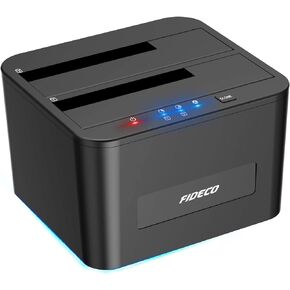 FIDECO Hard Drive Docking Station, USB 3.0 SATA HDD Docking Station for 2.5 & 3.5 inch SATA HDD/SSD, Dual Bay, Support Offline Clone and UASP
KWD 11.500
FIDECO Hard Drive Docking Station, USB 3.0 SATA HDD Docking Station for 2.5 & 3.5 inch SATA HDD/SSD, Dual Bay, Support Offline Clone and UASP
KWD 11.500




