MEKO Universal Stylus Pencil for Apple iPad & iPhone & Android & Samsung, 2X Fast Charge Stylus Pen for All Touch Screen, High Sensitivity Stylus for Smartphone Tablet Apple Watch-White
Compatible with all devices: The MEKO universal stylus penn employs the latest dual-system mode technology for full compatibility with all touchscreen devices. With a simple switch, seamlessly transition between iPad-specific mode and modes for other device models. Capture inspiration anytime, anywhere, and unleash boundless creativity
Other Devices Mode: Press the "DOWN" button of phone stylus to switch to Other Device Mode, which is compatible not only with iPad models prior to 2018, but also with many Android touch devices, including iPhone, iWatch, Samsung Galaxy, Xiaomi, Google, Motorola, and tablets. This tablet pen works perfectly with all capacitive touchscreen devices, and its extensive compatibility allows you to use one stylus pen across multiple devices
iPad Mode: Press of the "UP" button, you can switch the pencil to iPad Mode. This mode is compatibility with iPad 2018-2025, delivering a writing experience as smooth as the Apple Pencil. Its palm rejection technology intelligently recognises the ipad stylus's movements, preventing accidental touches for a fluid, natural feel—just like writing on paper
High Precision & Sensitivity: Featuring a premium 1.5mm tip, this ipad a16 pen delivers a rapid response with no breakpoints, no skips or lag. It allows you to effortlessly write small text and draw fine lines, just like with a real pencil—perfectly meeting the demands of artists and professionals for high-precision work. Please note: This ipad stylus pen does not support pressure sensitivity
Fast Charge & Long-Lasting Battery: Featuring a USB-C charging port, this tablet stylus achieves a full charge in just 15 minutes. It offers up to 9 hours of continuous use in iPad Mode and approximately 7 hours in Other Devices Mode. This ultra-Long battery life reliably supports your long work sessions, keeping you online from day to night
Usage Instructions: The Apple iPhone Pencil requires no Bluetooth connection to operate. Simply press the button on the side of the tip to activate it. It automatically enters sleep mode after 5 minutes of inactivity. The top and bottom buttons on the body allow you to freely switch between two modes: iPad mode and other device mode


 -14%
Stylus Pens for Touch Screens, MEKO 5 Pack High Sensitivity & Precision Mini Disc Stylus Pens for iPad iPhone Tablets Samsung Galaxy All Universal Touch Screen Devices
KWD 3
-14%
Stylus Pens for Touch Screens, MEKO 5 Pack High Sensitivity & Precision Mini Disc Stylus Pens for iPad iPhone Tablets Samsung Galaxy All Universal Touch Screen Devices
KWD 3
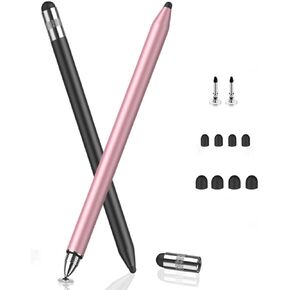 -30%
MEKO 3 in 1 Stylus Pens for Touch Screens, High Sensitivity & Precision Capacitive Stylus Pencil for Apple iPad iPhone Tablets Samsung Galaxy All Universal Touchscreen Devices (2 Pack-Black/Rose Gold)
KWD 3.500
-30%
MEKO 3 in 1 Stylus Pens for Touch Screens, High Sensitivity & Precision Capacitive Stylus Pencil for Apple iPad iPhone Tablets Samsung Galaxy All Universal Touchscreen Devices (2 Pack-Black/Rose Gold)
KWD 3.500
![MEKO Universal Stylus,[2 in 1 Precision Series] Disc Stylus Touch Screen Pens for All Capacitive Touch Screens Cell Phones, Tablets, Laptops Bundle with 6 Replacement Tips - (2 Pcs, Black/Black) in Kuwait](https://cdn1.tilga.com/md/prod/3/6039/3/155489646.37720.jpg) MEKO Universal Stylus,[2 in 1 Precision Series] Disc Stylus Touch Screen Pens for All Capacitive Touch Screens Cell Phones, Tablets, Laptops Bundle with 6 Replacement Tips - (2 Pcs, Black/Black)
KWD 5.500
MEKO Universal Stylus,[2 in 1 Precision Series] Disc Stylus Touch Screen Pens for All Capacitive Touch Screens Cell Phones, Tablets, Laptops Bundle with 6 Replacement Tips - (2 Pcs, Black/Black)
KWD 5.500
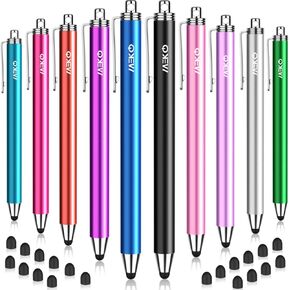 -44%
Stylus Pens for Touchscreens, MEKO 10 Pack High Precision 0.24" Replaceable Thin Tip Stylus with 20 Pcs Replacement Tips for iPad iPhone Tablets Smartphone&All Universal Touch Screen(10 Stylus+20Tips)
KWD 2.500
-44%
Stylus Pens for Touchscreens, MEKO 10 Pack High Precision 0.24" Replaceable Thin Tip Stylus with 20 Pcs Replacement Tips for iPad iPhone Tablets Smartphone&All Universal Touch Screen(10 Stylus+20Tips)
KWD 2.500




