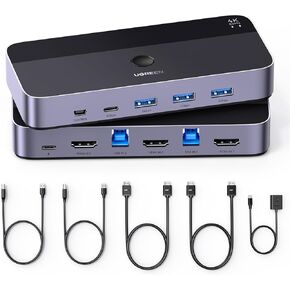
UGREEN HDMI KVM Switch 1 Monitor 2 Computers, 4K@60Hz with 4 USB 3.0 Ports KVM Switches for 2 Computers Share One HDMI Monitor Keyboard Mouse Hard Drives Webcam with 2 USB Cables, Controller
KVM Switch 1 Monitors 2 Computers: This kvm switches allow 2 computers to share 1 monitor and 4 USB 3.0 devices such as a set keyboard, mouse, hard drives, U disk, and printer. It's not only a keyboard mouse switch, but also an HDMI switch. You can easily switch between two hosts, which keeps your workspace tidy, and helps to maximize productivity. (ONLY supports One HDMI monitor.)
With 4 USB 3.0 Ports: This USB KVM switch has 4 USB 3.0 ports (3 USB-A+1 USB-C) for sharing USB flash drives, printers, hard drives, U-disk, webcame and other USB devices. USB 3.0 offers data transfer speeds of up to 5Gbps, while USB 2.0 is only 480Mbps. It allows faster file and picture transfer, and reducing clutter and enhancing efficiency
Ultra HD 4K Resolution: This 2 computers 1 monitor switch supports the resolution up to 4K@60Hz, and can also be backward compatible with 4K@30Hz, 1080P240Hz or lower resolution. UGREEN KVM switch HDMI also supports HDMI 2.0, HDCP2.2/1.4, 3D and HDR, which makes images display more realistic, color is more bright and moving. Note: Please ensure that the resolution of the two devices at the input and the device at the output is consistent
Two Ways of Switching: The 4k KVM switch offers two switching ways, a button on the switch and a desktop controller. The remote lets you place the KVM switch out of sight or farther away, keeping your desk clean and organized. Just place the remote within easy reach, and with a simple press, switch quickly between two computers—making your desktop tidier and enhancing productivity. NOTE: Not support Hotkey switching and EDID emulation
Wide Compatibility & Driver-Free: This USB switch 2 computers supports Windows, MacOS, and Linux systems. Just plug and play and without any installation. This KVM switch 2 computer 1 monitor is compatible with most HDMI source devices, such as PS5/4/3, Switch/Switch 2, Xbox One, TV Box, PC, Laptop, etc. It is widely applied for enterprise, office, multimedia teaching, meeting rooms, gaming rooms, research tests, etc
NOTE: 1, Each PC must be connected with an HDMI cable (for video transfer) and a USB cable (for data transfer) for normal use. 2, Please ensure that it is connected to a power source when using. 3, Not supported for use with docking station. 4, This HDMI KVM switch is NOT a DP KVM switch or USB-C KVM switch


![UGREEN 16K DisplayPort Cable 2.1 [VESA Certified] DP2.0 40Gbps Support 8K@240Hz 4K@240Hz HDR, HDCP, DSC 1.2a, Braided Display Port Cable Cord Compatible FreeSync G-Sync Video Card Monitor, 6.6FT in Kuwait](https://cdn1.tilga.com/md/prod/3/8683/3/200591888.64433.jpg) -10%
UGREEN 16K DisplayPort Cable 2.1 [VESA Certified] DP2.0 40Gbps Support 8K@240Hz 4K@240Hz HDR, HDCP, DSC 1.2a, Braided Display Port Cable Cord Compatible FreeSync G-Sync Video Card Monitor, 6.6FT
KWD 39.500
-10%
UGREEN 16K DisplayPort Cable 2.1 [VESA Certified] DP2.0 40Gbps Support 8K@240Hz 4K@240Hz HDR, HDCP, DSC 1.2a, Braided Display Port Cable Cord Compatible FreeSync G-Sync Video Card Monitor, 6.6FT
KWD 39.500
 -14%
UGREEN HDMI KVM Switch 2 Monitors 2 Computers 4K@60Hz, with 4 USB 3.0 Ports for 2 Computers Sharing 2 Monitors Keyboard Mouse Printer with 4 HDMI Cables, 2 USB Cables, Power Adapter and Controller
KWD 28.500
-14%
UGREEN HDMI KVM Switch 2 Monitors 2 Computers 4K@60Hz, with 4 USB 3.0 Ports for 2 Computers Sharing 2 Monitors Keyboard Mouse Printer with 4 HDMI Cables, 2 USB Cables, Power Adapter and Controller
KWD 28.500
 -10%
UGREEN 8K@60Hz HDMI KVM Switch 4 Computers with 4 USB 3.0 Ports Aluminum KVM Switches Share One Monitor Keyboard Mouse Hard Drives Printer with 4 HDMI Cables, 4 USB Cables and Desktop Controller
KWD 44
-10%
UGREEN 8K@60Hz HDMI KVM Switch 4 Computers with 4 USB 3.0 Ports Aluminum KVM Switches Share One Monitor Keyboard Mouse Hard Drives Printer with 4 HDMI Cables, 4 USB Cables and Desktop Controller
KWD 44
 -18%
UGREEN USB 3.0 HDMI KVM Switch with 4 USB 3.0 Ports (3 USB-A+1 USB-C) 4K@60Hz for 2 Computers Sharing Monitor Keyboard Mouse Hard Drives Printer, with 2 HDMI Cables, 2 USB Cables and Controller
KWD 18.500
-18%
UGREEN USB 3.0 HDMI KVM Switch with 4 USB 3.0 Ports (3 USB-A+1 USB-C) 4K@60Hz for 2 Computers Sharing Monitor Keyboard Mouse Hard Drives Printer, with 2 HDMI Cables, 2 USB Cables and Controller
KWD 18.500




