ProtoArc Wired USB Trackpad Mouse for Windows 10/11, Large High-Precision Touchpad Mouse, Multi-Gesture with Ultra Slim Portable Aluminum Trackpad for Computer/Desktop/Laptop, White and Silver
Windows Only: The Large Wired Trackpad for Windows10/11 is compatible with Windows 11, Windows 10, PC, laptops and desktop computers. Note: Not compatible with Mac/Chrome OS/Linux. Not recommended for use on other systems. Some touchpad gestures or functions may be missing
Convenient Physical Buttons: The touchpad features physical left and right buttons at the bottom, functioning like mouse buttons. It also supports single-finger clicks for left-clicking and two-finger taps for right-clicking, allowing for easy text and document selection and drag-and-drop operations
File Drag and Drop & Text Selection: Double-tap and hold with one finger, then slide to drag files or select text
Multi-Gesture Support: The touchpad supports various gestures, recognizing up to four fingers. It offers rapid and sensitive response, providing a smoother user experience than typical laptop touchpads. It supports common functions including clicking, scrolling up and down, and pinch-to-zoom for images
Adjust Cursor Speed: Open "Windows Settings" → "Bluetooth & other devices" → "Touchpad," and drag the "Cursor Speed" slider to adjust the speed to your preference (slow ←→ fast).
Large Metal Touchpad: The touch area reaches 6.4 inches (approximately 16.3 cm), measuring 6.4 × 4.8 × 0.4 inches, with a thickness between 0.19 and 0.39 inches, compared with the traditional touch pad is even thinner
Plug and Play, Stable Connection: Simply connect to your computer's USB port via a USB-C cable to use; no additional drivers are required. The stable and reliable connection allows you to easily enjoy a smooth operating experience


 -3%
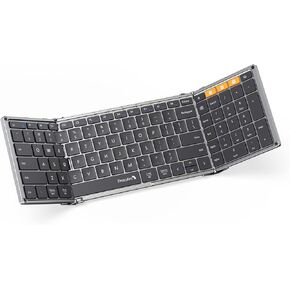
ProtoArc Foldable Bluetooth Keyboard, XK01 Folding Wireless Portable Keyboard with Numeric Keypad, Full-Size Travel Keyboard for iPad Tablet Smartphone Laptop PC Windows iOS Android, Black Silver
KWD 15
-3%
ProtoArc Foldable Bluetooth Keyboard, XK01 Folding Wireless Portable Keyboard with Numeric Keypad, Full-Size Travel Keyboard for iPad Tablet Smartphone Laptop PC Windows iOS Android, Black Silver
KWD 15
 Foldable Keyboard and Mouse, ProtoArc XKM01 Folding Bluetooth Keyboard Mouse Combo for Business and Travel, 2.4G+Dual Bluetooth Full-Size Portable Keyboard for Laptop iPad Tablet - Blue & Black
KWD 26.500
Foldable Keyboard and Mouse, ProtoArc XKM01 Folding Bluetooth Keyboard Mouse Combo for Business and Travel, 2.4G+Dual Bluetooth Full-Size Portable Keyboard for Laptop iPad Tablet - Blue & Black
KWD 26.500
 ProtoArc Ergonomic Foldable Keyboard Mouse, XKM03 Portable Folding Bluetooth Keyboard Mouse Combo for Business and Travel, Split Design, 3 Bluetooth, Rechargeable, for iPad, Tablet, iPhone, Laptop
KWD 37
ProtoArc Ergonomic Foldable Keyboard Mouse, XKM03 Portable Folding Bluetooth Keyboard Mouse Combo for Business and Travel, Split Design, 3 Bluetooth, Rechargeable, for iPad, Tablet, iPhone, Laptop
KWD 37
 -24%
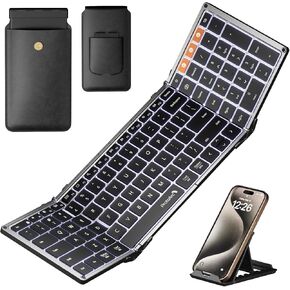
ProtoArc Backlit Foldable Keyboard, XK01 Plus Folding Portable Bluetooth Keyboard for Travel, Full Size External Wireless Keyboard with Backlight for iPad Surface Tablet Smartphone Laptop PC
KWD 20.500
-24%
ProtoArc Backlit Foldable Keyboard, XK01 Plus Folding Portable Bluetooth Keyboard for Travel, Full Size External Wireless Keyboard with Backlight for iPad Surface Tablet Smartphone Laptop PC
KWD 20.500




