NCGGY 192KHz DAC Optical to 3.5mm Converter,Optical Audio Cable to AUX Cable Adapter,Digital to Analog Audio Converter for HDTV DVD Set-top Boxes (Unidirectional from O-ptical to AUX Only)
Optical to 3.5mm Converter:Digital to analog converter converts optical (SPDIF/Toslink) digital audio signals to stereo 3.5mm AUX port output.(Not reversible: Cannot be used to transfer audio from 3.5mm to optical)
Uperior Sound Quality:The optical audio cable to aux achieves a high-quality sound sample rate of 192KHz and supports optical inputs at 32, 44.1, 48, 96, and 192KHz as well as data streams at 24-bit,Enhance your audio experience with precise details.
Dual-channel audio mode:Supports Uncompressed 2 channel LPCM or PCM Digital Audio Signal Output,Provides Electromagnetic-noise-free Transmission.【Note】Not support 5.1 or channel audio like DTS or Dolby from TV, please change audio format of your TV to PCM or Stereo.
Note:The TV's digital audio output format must be set to PCM or LPCM. Volume cannot be adjusted using the TV remote; please use headphones or speakers to adjust the volume.
Easy to Install and Simple to Operate: The fiber optic cable, plugged into the TV's fiber optic port, is solely for TV audio signal output and does not support PS3、PS4、PS5 or other devices. The 3.5mm jack is for connecting speakers or headphones to receive audio signals.
Note:Before use, the USB power cable must be plugged into a 5V USB power port; otherwise, it will not work. If you hear a buzzing sound or have no sound output after correct connection, try plugging the USB power cable into a separate USB charger. (The TV's audio format must be changed to PCM or LPCM.)
Note:Please set audio output to PCM or Stereo mode before use.Here is how to set the PCM format.S-ny TV: PCM setting path: Device main page - system settings - image and sound - sound settings - digital audio output - PCM.Sams TV: Settings - Sound - Expert Settings - Audio Format-PCM.LG TV: Menu - All Settings - Sound Output - Optical- Digital Sound Output - PCM.


 HDMI ARC Adapter to RCA Audio Converter,192KHz Multi Function Audio Converter, DAC Coaxial Optical ARC Input to Coaxial +Optical +L/R+3.5mm Jack Output for TV
KWD 8.500
HDMI ARC Adapter to RCA Audio Converter,192KHz Multi Function Audio Converter, DAC Coaxial Optical ARC Input to Coaxial +Optical +L/R+3.5mm Jack Output for TV
KWD 8.500
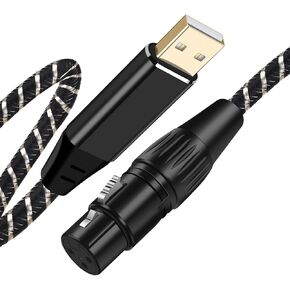 NCGGY USB Microphone Cable 6.6Ft,XLR to USB Cable,USB Male to XLR Female Mic Link Cable Adapter for Microphones,Recording,Karaoke,Live Podcast
KWD 6
NCGGY USB Microphone Cable 6.6Ft,XLR to USB Cable,USB Male to XLR Female Mic Link Cable Adapter for Microphones,Recording,Karaoke,Live Podcast
KWD 6
 USB C to Dual 6.35mm 1/4 inch Stereo Splitter Y Cable,6FT Type C to Dual 6.35mm 1/4 inch TS Audio Cord for iPhone 15 Series,Tablet,Smartphone,Laptop Link Amplifier,Speaker,
KWD 6
USB C to Dual 6.35mm 1/4 inch Stereo Splitter Y Cable,6FT Type C to Dual 6.35mm 1/4 inch TS Audio Cord for iPhone 15 Series,Tablet,Smartphone,Laptop Link Amplifier,Speaker,
KWD 6
 -10%
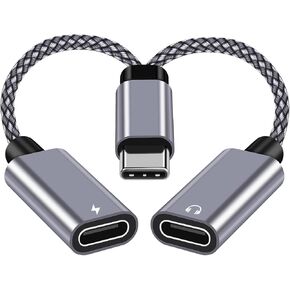
USB C Splitter 1 in 2 Out,Hi-Fi Audio Adapter,Dual USB C Headphone and Charger Adapter Support Call PD 27W Charge, Compatible with i-phone15 Series/Pixel 2XL/3XL/Galaxy S22 S21Note 20
KWD 4.500
-10%
USB C Splitter 1 in 2 Out,Hi-Fi Audio Adapter,Dual USB C Headphone and Charger Adapter Support Call PD 27W Charge, Compatible with i-phone15 Series/Pixel 2XL/3XL/Galaxy S22 S21Note 20
KWD 4.500



