Surface Pen for Surface Pro 13/12/11/9/10/8/X/7/6/5/4/3, Surface Pro Pencil with Precision Tip, Palm Rejection, Tilt Sensitivity, Surface Stylus for Surface Go 3/Go 2/Book/Laptop 5 (Gray)
Compatibility - Pencil for surface pro with Surface Pro 12/11/10/9/8/7/7+/6/5/4/3, Surface Laptop / Laptop 2 / Laptop 3 / Laptop 4 / Laptop 5, Surface Book / Book 2 / Book 3. Surface GO 1/Surface GO 2/Surface GO 3/GO 4, Surface Studio/Surface Studio 2. Note: our stylus is not compatible with Surface Laptop 7 2024
Professional-Grade Pen Strokes - Surface pro stylus built-in tilt-sensitive technology detects your pen angle, just like a real brush. Whether shading or rendering, seamlessly transition from fine lines to broad strokes with natural stroke movement, adding depth and texture to your creative expression.
Intelligent Palm Rejection - Surface pro pen advanced palm rejection and dual-touch design allow you to rest your palm naturally on the screen, eliminating the need to lift it. This not only effectively prevents accidental touches but also provides the pure and comfortable feeling of writing on paper, significantly improving focus and efficiency when writing and drawing.
No More Battery Anxiety - Surface pencil charging speed is doubled compared to the previous generation. A mere 30 minutes of charging provides hours of continuous use. Whether you're in a meeting or creating something inspired, you can completely eliminate the worry of waiting.
Magnetic Quick Connect for Portability - Stylus pen for surface pro's dual magnets securely attach to your tablet or computer, making it easy to store and carry.
Efficient Control and One-Touch Switching - Pencil for surface the eraser and right-click buttons are thoughtfully designed. No need to constantly switch tools in the software; simply erase with the end of the pen – intuitive and efficient. Customizable side buttons enable rich functions like right-clicking and shortcut menus, making your workflow smoother and more efficient.


 Surface Pro 9 Docking Station, Surface Pro 9 Hub Adapter with 100 Mbps LAN, 4K HDMI, 100W USB-C (Display+Data+PD Charging), 2 USB 3.0, 3.5mm Audio, SD/TF Card Reader for Microsoft Surface Pro 9/X
KWD 14
Surface Pro 9 Docking Station, Surface Pro 9 Hub Adapter with 100 Mbps LAN, 4K HDMI, 100W USB-C (Display+Data+PD Charging), 2 USB 3.0, 3.5mm Audio, SD/TF Card Reader for Microsoft Surface Pro 9/X
KWD 14
 2024 New Surface Pen for Microsoft Surface Pro 9/8/7/6/5/4/3/X,Surface Go/Book/Studio/Laptop,4096 Pressure Sensitivity Windows Stylus Pen,USB-C Charging,Eraser & Right-Click,Magnetic Attraction
KWD 12
2024 New Surface Pen for Microsoft Surface Pro 9/8/7/6/5/4/3/X,Surface Go/Book/Studio/Laptop,4096 Pressure Sensitivity Windows Stylus Pen,USB-C Charging,Eraser & Right-Click,Magnetic Attraction
KWD 12
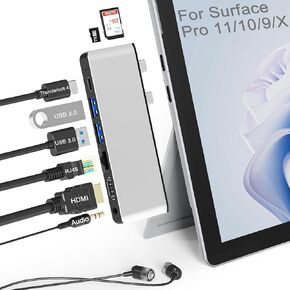 Surface Pro 11 10 9 Docking Station with 4K HDMI,USB-C Thunderbolt 4(8K Video+40Gbps+100W Power),100M Ethernet,USB3.0,SD TF Card Slot,3.5mm Audio,Triple Display for Surface Pro 11/10/9/X Accessories
KWD 14
Surface Pro 11 10 9 Docking Station with 4K HDMI,USB-C Thunderbolt 4(8K Video+40Gbps+100W Power),100M Ethernet,USB3.0,SD TF Card Slot,3.5mm Audio,Triple Display for Surface Pro 11/10/9/X Accessories
KWD 14
 Stylus Pen for Microsoft Surface, Surface Pro Pen Stylus for Surface Pro 9/11/10/8/X/7/6/5/4/3, Surface Pro 11 Stylus Pen for Windows 11 Copilot+ PC, Surface Pen for Surface Go 2/3/Book/Laptop/Studio
KWD 12
Stylus Pen for Microsoft Surface, Surface Pro Pen Stylus for Surface Pro 9/11/10/8/X/7/6/5/4/3, Surface Pro 11 Stylus Pen for Windows 11 Copilot+ PC, Surface Pen for Surface Go 2/3/Book/Laptop/Studio
KWD 12




