USB C Docking Station Dual Monitor, Laptop Docking Station 3 Monitors Triple 4K 60Hz Display with 2 HDMI, DisplayPort, 1Gbps Ethernet, 100W PD, 2 USB-C Data, USBC Dock for Dell, HP, Lenovo, etc
【Efficient USB C Docking Station】This all-in-one Type-C dock expands your laptop's single USB-C port into nine versatile ports: two 4K@60Hz HDMI ports, one 4K@60Hz DisplayPort, one Gigabit Ethernet port, one 100W PD fast-charging port, and two 5Gbps USB-C data ports. Effortlessly connect all your office peripherals while keeping your workspace neat and organized.
【Triple Display Docking Station for 4K Clarity】Significantly boost multitasking efficiency. This laptop docking station supports simultaneous output via HDMI and DisplayPort, enabling connection to three monitors—each supporting ultra-high-definition visuals up to 4K @ 60Hz. Whether handling complex reports, coding, or graphic design, enjoy an immersive, expansive view. Note: macOS systems only support mirroring mode.
【100W Power Delivery & Stable Gigabit Ethernet】Powerful charging, stable connectivity. The PD 3.0 fast-charging port supports up to 100W power output, capable of fully powering laptops. The built-in Gigabit Ethernet port delivers more stable, low-latency network connections than Wi-Fi, ensuring smooth video conferencing and faster game downloads.
【High-Speed Data Transfer Docking Station】Experience lightning-fast file transfers. This 9-in-1 USB-C dock features two USB-C data ports with transfer speeds up to 5Gbps, enabling quick backups of portable hard drives or transfers of large video files—efficient and convenient, without lengthy waits. Note: The 5Gbps USB-C ports support data transfer only and do not provide charging or video functionality.
Plug and play for effortless adaptability across multiple scenarios. This docking station offers broad compatibility with most USB-C laptops on the market (such as MacBook, HP, Dell, Lenovo, etc.). Its compact design ensures portability, making it an ideal expansion base for home offices and business travel. Note: Ensure your laptop's USB-C port supports “DP Alt Mode.”


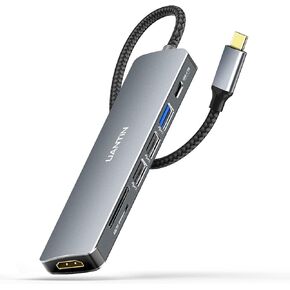 USB C Hub 7 in 1 Multiport Adapter with 4K HDMI Dongle, 100W PD, SD/TF Card Reader, 3 USB-A, USBC Docking Station for MacBook Mac Pro/Air, Dell, HP, ASUS, Acer and Other Type C Laptops
KWD 4.500
USB C Hub 7 in 1 Multiport Adapter with 4K HDMI Dongle, 100W PD, SD/TF Card Reader, 3 USB-A, USBC Docking Station for MacBook Mac Pro/Air, Dell, HP, ASUS, Acer and Other Type C Laptops
KWD 4.500
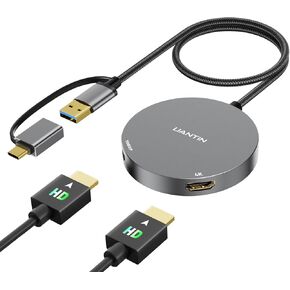 USB 3.0 or USB C to Dual HDMI Splitter Extender Display for Windows and Mac M1/M2/M3 | 4K/1080P USB C to HDMI Adapter for Dual Monitor, Multiple for Thunderbolt MacBook, Dell, HP, Lenovo etc
KWD 12.500
USB 3.0 or USB C to Dual HDMI Splitter Extender Display for Windows and Mac M1/M2/M3 | 4K/1080P USB C to HDMI Adapter for Dual Monitor, Multiple for Thunderbolt MacBook, Dell, HP, Lenovo etc
KWD 12.500
![USB C to HDMI 2.1 Cable (8K@60Hz,4K@144Hz,2K@240Hz) 6Ft Type C to HDMI 8K Cord Support HDCP2.3/HDR10 [Thunderbolt 3/4 Compatible] for MacBook Pro/Air,iPad Pro,XPS,S22,iPhone 15 Series in Kuwait](https://cdn1.tilga.com/md/prod/3/4415/3/133324041.41060.jpg) -7%
USB C to HDMI 2.1 Cable (8K@60Hz,4K@144Hz,2K@240Hz) 6Ft Type C to HDMI 8K Cord Support HDCP2.3/HDR10 [Thunderbolt 3/4 Compatible] for MacBook Pro/Air,iPad Pro,XPS,S22,iPhone 15 Series
KWD 7
-7%
USB C to HDMI 2.1 Cable (8K@60Hz,4K@144Hz,2K@240Hz) 6Ft Type C to HDMI 8K Cord Support HDCP2.3/HDR10 [Thunderbolt 3/4 Compatible] for MacBook Pro/Air,iPad Pro,XPS,S22,iPhone 15 Series
KWD 7
 Mini Wireless Carplay Adapter for Apple (2024 Upgrade) Converts Wired to Wireless Car Play Dongle for iPhone, Wireless Plug & Play CarPlay for Cars from 2016 & for Apple iOS 10+ Android 11+
KWD 8.500
Mini Wireless Carplay Adapter for Apple (2024 Upgrade) Converts Wired to Wireless Car Play Dongle for iPhone, Wireless Plug & Play CarPlay for Cars from 2016 & for Apple iOS 10+ Android 11+
KWD 8.500




