- Shopping, made easy.
- /
- Get the app!
There are three mutually exclusive ways to provide power to the board:
USB-to-UART Port and ESP32-S3 USB Port (either one or both), default power supply (recommended)
5V and G (GND) pins
3V3 and G (GND) pins
Hardware Setup:
Connect the board with the computer using USB-to-UART Port or ESP32-S3 USB Port. In subsequent steps, USB-to-UART Port will be used by default
Software Setup:
Please proceed to Get Started, where Section Installation will quickly help you set up the development environment and then flash an application example onto your board
Package include:
3 x ESP32-S3-DevKit C N16R8 development board
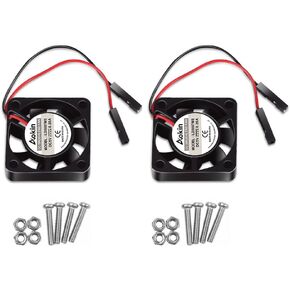 2pcs 3007 Fan for Raspberry Pi 5 30x30x7mm Cooler Fan Pi Brushless Cooling Fan 30MM 1.18in 3.3V 5V DC Quiet Fan for Raspberry Pi 4, Pi 3 B+, Pi 3 B, Pi 2, Pi B+, Pi Zero/Zero W,Robot Project
KWD 2.500
2pcs 3007 Fan for Raspberry Pi 5 30x30x7mm Cooler Fan Pi Brushless Cooling Fan 30MM 1.18in 3.3V 5V DC Quiet Fan for Raspberry Pi 4, Pi 3 B+, Pi 3 B, Pi 2, Pi B+, Pi Zero/Zero W,Robot Project
KWD 2.500
 Dorhea 4PCS DS3231 Real Time Clock Module RTC Clock Memory Module 3.3V/5V for Raspberry Pi
KWD 2.500
Dorhea 4PCS DS3231 Real Time Clock Module RTC Clock Memory Module 3.3V/5V for Raspberry Pi
KWD 2.500
 DORHEA ESP32 Cam WiFi Bluetooth Development Board with OV2640 Camera Module + Micro USB to Serial Port CH340C 4.75V-5.25V Nodemcu for Raspberry Pi - 3 Set
KWD 10.500
DORHEA ESP32 Cam WiFi Bluetooth Development Board with OV2640 Camera Module + Micro USB to Serial Port CH340C 4.75V-5.25V Nodemcu for Raspberry Pi - 3 Set
KWD 10.500
 DORHEA 5PCS ESP8266 ESP-12F Development Board Internet NodeMCU WiFi Serial Wireless Module NodeMCU-12F CP2102 Based on ESP8266 WiFi Module for motherbord IDE/Micropython
KWD 7
DORHEA 5PCS ESP8266 ESP-12F Development Board Internet NodeMCU WiFi Serial Wireless Module NodeMCU-12F CP2102 Based on ESP8266 WiFi Module for motherbord IDE/Micropython
KWD 7




