ProtoArc Bluetooth Keyboard and Mouse Combo, KM60 Bluetooth + USB Multi Device Rechargeable, Wrist Rest, Full Size Wireless Keyboard Mouse Set, Compatible with Windows/Android Computers, Black
Comfort Wrist Rest: Designed for long hours of typing, this bluetooth keyboard features a wrist rest with leather-textured surface. It promote a more natural hand position, fits your fingers and relieves wrist strain. The adjustable stand allows you to set the keyboard to the most comfortable height, making it ideal for long-term use.
Switch up to 3 Devices: This wireless keyboard and mouse combo supports both 2.4GHz & Bluetooth connections, allowing you to switch smoothly between your laptop, tablet, and computer by pressing a single button. The keyboard mouse combo is well compatible with Windows 7/8/10/11, Mac OS X 10.12, Android 5.0 or higher.【Note: 2.4G channel only supports WIN systems, while Bluetooth supports all systems】
Type-C Rechargeable Battery: Say goodbye to constantly changing batteries! Our Bluetooth keyboard mouse combo features built-in lithium batteries—500mAh for the keyboard and 300mAh for the mouse. Recharge easily via Type-C cable, and enjoy smart power-saving with auto sleep mode after 60 minutes of inactivity.
Full-size and Quick Access: With Standard US QWERTY layout, bluetooth keyboard combo makes each key on the number pad independent and well-spaced, greatly avoiding pressing the wrong key. This computer keyboard (430×94.9×11.73 mm) features a full-size layout with a numeric keypad and 13 dedicated multimedia function keys to improve work efficiency.
Silent Keyboard & Adjustable DPI Mouse: This wireless keyboard boasts a responsive scissor switch, allowing for efficient and quiet typing. The low-profile design and soft-touch keys elevate the typing experience of fingertip comfort to a new level. The mouse features three adjustable DPI levels of 1000/1600/2400, providing you with customizable sensitivity options.
Multimedia Shortcut Keys: 12 shortcut keys can immediately access to homepage, switch apps, volume and more. Press Fn+ESC key to activate the FN functions, you can perform F1 ~ F12 functions to increase your workflow and productivity greatly(Note: Press Fn+ESC to Turn on/Turn off the Fn functions)


 -26%
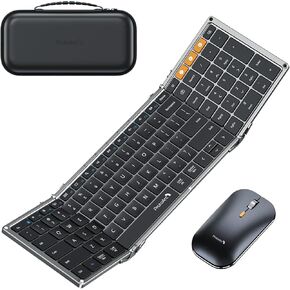
Foldable Keyboard and Mouse, ProtoArc XKM01 Folding Bluetooth Mouse Combo for Business Travel, 2.4G+Dual Bluetooth, USB-C Rechargeable, Full-Size Portable Laptop iPad Tablets
KWD 24.500
-26%
Foldable Keyboard and Mouse, ProtoArc XKM01 Folding Bluetooth Mouse Combo for Business Travel, 2.4G+Dual Bluetooth, USB-C Rechargeable, Full-Size Portable Laptop iPad Tablets
KWD 24.500
 Foldable Keyboard and Mouse, ProtoArc XKM01 Folding Bluetooth Keyboard Mouse Combo for Business and Travel, 2.4G+Dual Bluetooth Full-Size Portable Keyboard for Laptop iPad Tablet - Blue & Black
KWD 26.500
Foldable Keyboard and Mouse, ProtoArc XKM01 Folding Bluetooth Keyboard Mouse Combo for Business and Travel, 2.4G+Dual Bluetooth Full-Size Portable Keyboard for Laptop iPad Tablet - Blue & Black
KWD 26.500
 -19%
ProtoArc Backlit Foldable Keyboard, XK01 Plus Folding Portable Bluetooth Keyboard for Travel, Full Size External Wireless Keyboard with Backlight for iPad Tablet Laptop - Blue Connect Button
KWD 21.500
-19%
ProtoArc Backlit Foldable Keyboard, XK01 Plus Folding Portable Bluetooth Keyboard for Travel, Full Size External Wireless Keyboard with Backlight for iPad Tablet Laptop - Blue Connect Button
KWD 21.500
 -6%
ProtoArc Backlit Wireless Ergonomic Keyboard, EK01 Plus Full Size Ergo Keyboard with Wrist Rest, Split Design, Rechargeable, Bluetooth and USB, Natural Typing Compatible with Windows/Mac/Android,Green
KWD 31
-6%
ProtoArc Backlit Wireless Ergonomic Keyboard, EK01 Plus Full Size Ergo Keyboard with Wrist Rest, Split Design, Rechargeable, Bluetooth and USB, Natural Typing Compatible with Windows/Mac/Android,Green
KWD 31




