- Shopping, made easy.
- /
- Get the app!
‼️ Important Notice (Must Read Before First Use) 1. Charge fully before use. Must use the included dedicated car charger. 2. Truck/RV users: Must set vehicle dimensions. 3. Check if the map is a local map; if not, download a local map. 4. Set the time to local time. 5. Screen obstruction: Rotate the mount to adjust to the appropriate angle. 6. Charging and power-on failure: Plug in the power source and check if the battery is sufficiently charged. Please use the original car charger; otherwise, it may damage the battery and prevent the device from booting up. 7. When searching for a GPS signal for the first time, please go to an open area; do not search for a GPS signal in areas blocked by buildings. The initial signal search takes 30 minutes. ‼️ [New “Truck User Guide” Module] 🚛 Truck/RV User-Specific Settings Avoid navigating to height-restricted or width-restricted roads: 1. Go to Settings → Route Settings → Vehicle → Select “Truck” 2. Enter accurately: Width___feet / Height___feet / Weight___pounds 3. Save as default profile ‼️ [New “Set Time” module] 1. Please click ‘Date Time'. Set the time you want. 2. Click on ‘Navigation' and find the setting 3. Click ‘Regional' to set the map time. 4. Click on ‘Units and Formats', then click ‘Time Format' and select 12/24 hours. Since ‘Date Time' only supports the 24-hour system, we recommend choosing the 24-hour system. 5. After completing step 4, click ‘Back', then click ‘Time Zone'. If you do not want to update the time automatically or use daylight saving time, please disable ‘Use Auto Time Zone' and ‘Daylight Savings'. Set the same time zone as in the first step. ‼️[New “Screen Installation Tips” module] (Solves obstruction issues) 📲 7-inch screen perfect installation solution: 1. Installation location: Lower right corner of the windshield 2. Use the included sunshade (to reduce glare) 3. Adjust the bracket angle: Tilt the screen forward by 15° ‼️ [New “Find Address” module] 1. Find Address: Navigation → Destination → Find Address → Enter Your Address Example: Step 1: Enter Country or State Step 2: Enter City or ZIP Code Step 3: Enter Street Name Step 4: Enter House Number ‼️[How to turn off speed alerts] Navigation → Settings → Sounds and Warnings → Speed Warning Settings
 Pyle Parametric Equalizer with Subwoofer - 5 Volt RMS Pre-Amp Output with Subwoofer Gain Control, and 2 Input Sources Selectable, Red & Green Light Illumination Selector
KWD 19
Pyle Parametric Equalizer with Subwoofer - 5 Volt RMS Pre-Amp Output with Subwoofer Gain Control, and 2 Input Sources Selectable, Red & Green Light Illumination Selector
KWD 19
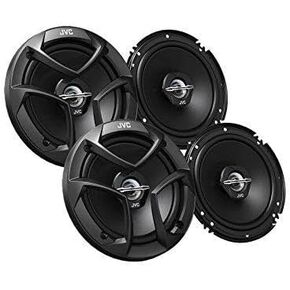 Package In Bulk Box - Two (2) Pairs Of CS-J620 6.5" 300W Car Audio 2-WAY Coaxial Car Speakers System / 4 Speakers
KWD 28.500
Package In Bulk Box - Two (2) Pairs Of CS-J620 6.5" 300W Car Audio 2-WAY Coaxial Car Speakers System / 4 Speakers
KWD 28.500
 -6%
Pyle Slim Subwoofer Box System - 400 Watts, Perfect for Mount Car Truck Audio Powered Subwoofer Enclosure, High Powered 8-inch Woofers with a Non-Pressed Paper Cone - PSBS8 Black
KWD 31
-6%
Pyle Slim Subwoofer Box System - 400 Watts, Perfect for Mount Car Truck Audio Powered Subwoofer Enclosure, High Powered 8-inch Woofers with a Non-Pressed Paper Cone - PSBS8 Black
KWD 31
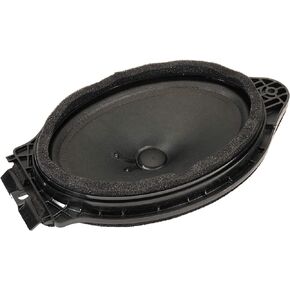 GM Genuine Parts 23288514 Rear Radio Speaker
KWD 22
GM Genuine Parts 23288514 Rear Radio Speaker
KWD 22




